20-22 Oct
Masih lagik tercongok dekat opis. ramai orang lain dah balik kampung pun pasal sabtu tu dah cuti deepavali. nak buat camno dah kene ikut jadual. tapi 3 hari terakhir sebelum cuti raya tuh memang meriah. kat opis bebudak nih duk pasang lagu raya. mana budak yang tak dapat cuti raya tuh tensen je dengar. camne tak kecoh, manager takde. yang ada pun sup je. tu pun geng aku. kehkehkehkeh.... alamatnya memang meriah dari pagi sampai petang.
23 Oct
Baru dapat balik ke kampung. balik ke lipis. mak ayah aku dah balik awal dah. aku dokleh le balik awai pasai ahad aku koje laie. balik kul 7 lebih lak tuh. tapi sakit betui jiwa aku, kene bawak slow gila, takut kene speed trap. buntu kepala otak aku nih. biasa aku bleh sampai dalam 2 jam lebih skit, tapi arituh sampai 3 jam. fufufufufu.... memang syiok dalam keta, keras pinggang aku. sampai dah tengah hari. lepak bakar lemang jap pastu lepak. petang keluar gi pasar ramadhan kat kampung. meriah jugak la. tapi satu je aku suka. kalau kat kl harga mahal tapi isi skit, tapi kat kampung aku, harga dia sama ngan kl tapi isi dia banyak sehh... untung beli. lepas buka puasa, gi lepak bandor dgn sepupu aku. ingatkan takda kedai melayu yang bukak lagik. ropenye ada la satu kedai. aa.. melepak situ la jawabnya. dah kembung minum air, cabut balik umah layan tv pulok. alih alih dah tidoq.
24 Oct
lepas sembahyang raya, makcik pakcik nenek semua nak gi jerantut dengan mela. ngikot je la, umah tok sedara. sebelum tuh singgah kubur arwah atuk jap. pastu terus zoooosssss ke jerantut. sesampai je terus gi umah tok tok sedara kat sana. peh lepak, makan, borak. terus betolak ke mela pulak. lepas abih agenda kat mela, balik semula ke lipis dalam kul 6 lebey. lepas maghrib sepupu aku ajak kluar lagik. aii... nak gi mana la kome kome nih. ikot je la, ceh... pegi makan rupanya, takpe aku layankan aje, balik tido~~!
25 Oct
Raya kedua, takda ke mana sangat pun. yang aku ingat nenek aku ajak bawak dia pi kenduri. takpe aaa... aku ikutkan aje, untung untung jumpa awek cun kat kenduri. bawak sekali sepupu aku kat sana. dah sampai, jeling jeling skit. pehh... mmg ada la awek cun. tapi... aku tak kenal. hahaahha... pas kenduri, balik umah je terus.
26 Oct
Dah nak bertolak balik ke s. alam pasal nak balik bagan datoh plak. tapi apa apa hal kita terjun sungai dulu. huhuhu... lepak kat pulau chekas dgn sepupu dan adik aku. tapi takda la lama sangat kat situ, pasal nak kene balik cepat. papehal syok la jugak layan mandi sungai, sejuk, nyaman, tenang jiwa. kehkehkehkeh.... pas puas mandi aku ngan adik aku terus bertolak ke s. alam. sampai shah alam dalam kul 6 lebey, pas maghrib terus bertolak ke bagan datoh. sampai dalam kul 11. sampai je, tgk lauk. peh.. sedap. layan makan dulu, layan tv terus tido sampai pagi.
27 Oct
Siang tak ke mana pun. duk kat umah je. pas semayan jumaat ingatkan nak jenjalan jap tapi maleh pulak. duk umah sampai petang. pas maghrib saja jenjalan kat pekan bagan datoh (pekan dia macam pekan koboi). aku ingatkan sunyi je, tapi dekat port makan peh... memang meriah. ramai orang makan kat situ. orang mancing pun ada. pusing pusing kejap pastu belik makan skit terus balik.
28 Oct
pas makan pagi, bertolak balik ke s. alam. sampai dalam kul 1. pehtu.... warghh.... aku kene selesema, batuk, sakit badan, lemah badan,sakit tekak, demam...!!!
p/s: 3 hari beb aku dapat mc, sakit nye pasal. isnin sampai rabu. tapi khamis kene keje laks... hukss...
Wednesday, November 01, 2006


Tuesday, October 10, 2006
raya raya...

Raya dah nak dekat. eh... betui la tu. masa aku taip nih, jam kat pc nih dah bertarikh 10/10/06. dalam 2 minggu lagik. sedar tak sedar dah 2 minggu pun puasa. alhamdulillah, puasa kali nih berjalan dengan baik. di samping kesibukan kerja dan jadual kerja yang cenggini gayanya, kejap je aku rasa dah dua minggu. sejak awal bulan aku keje malam je manjang, dan tetiap pagi dialog kat bawah nih mesti muncul. hahaha...
tahun ni aku rasa raya macam menarik je. awal awal dah apply cuti, pasal nak arrange schedule. dah siap siap duit raya utk sepupu aku yang cenonet semua, dan lelain lagik la. mebi sebab kerja baru, banyak mende baru, rezeki bertambah (alhamdulillah) cuma awek je takda.. kehkehkeh... haha... jgn ada yang nak pancing pancing aku satgi. aku jentik dahi korang nantik...
tahun nih rasanya aku balik kampung solo. pasal adik aku mebi balik awal, mak ayah aku balik pakai keta lain (keta baru, alhamdulillah lagik), aku cam besa.. pakai keta sendirik. bukannya apa. kalau aku naik ngan mak ayah aku, agak terbatas skit pergerakan aku dan tentera tentera aku kat kampung merangkap sepupu sepupu aku. asal balik je konpem ada je tempat nak serbu. paling suka pergi dekat kedai jual ABC. dok melangut, mengarut, merepek 4-5 orang kat situ. dah kenyang air batu, pusing pusing bandar 2-3 round, cabut balik umah. dahtu kalau aku naik keta orang mmg susah skit le nak menginvisiblekan dirik sendiri dan tentera tentera cabuk aku. kahkahkahkahk..... satu lagik, pi beraya konpem keta aku keta paling meriah. pasal semua muda muda (termasuk aku le tuh, tapi aku dalam kategori paling tua. ala.. aku pun baru je 24) dan paling cacamarba sekalik.
lama jugak cuti. ada la dalam 7 hari kot. bole lepak lama skit kat kampung sambil mandi air terjun kat pulau chekas (pulau chekas nih kat raub, aku kat lipis). pernah gi mandi sekali je dgn sepupu sepupu aku. tapi time tuh tak ramai orang. ha'ah mmg iye tak ramai pasal kitorang gi ari selasa. mana nak ramai. orang gi keje kitorang gi mandi air terjun.
tahun nih ada sikit kekurangan, pasal arwah atuk aku dah takda. dah 8 bulan meninggal. agak kurang meriah skit la. kalau sebelum nih masa sembahyang raya mmg arwah atuk aku jadi imam, tapi tahun nih dah orang lain. al-fatihah utk arwah atuk aku.
mak aku kata aku dah kurus skit. ekk.. aku tak pasan pun. tapi iye la kot pasal seluar aku rasa macam besar skit aa plak. mungkin sebab kurang makan dan jugak tak cukup tido. tido sehari 2-3 jam je camne nak layan. kekadang pening pening pun ada gak.
mende lagik aku nak update nih. panjang pulak aku naip. dah time nih je aku pree kat opis. dah balik umah kang banyak mende lain lak nak buat. lagipun dah agak lama jugak aku tak update.
tu je la kot...
assalamualaikum. selamat berpuasa dan berhari raya...
tahun ni aku rasa raya macam menarik je. awal awal dah apply cuti, pasal nak arrange schedule. dah siap siap duit raya utk sepupu aku yang cenonet semua, dan lelain lagik la. mebi sebab kerja baru, banyak mende baru, rezeki bertambah (alhamdulillah) cuma awek je takda.. kehkehkeh... haha... jgn ada yang nak pancing pancing aku satgi. aku jentik dahi korang nantik...
tahun nih rasanya aku balik kampung solo. pasal adik aku mebi balik awal, mak ayah aku balik pakai keta lain (keta baru, alhamdulillah lagik), aku cam besa.. pakai keta sendirik. bukannya apa. kalau aku naik ngan mak ayah aku, agak terbatas skit pergerakan aku dan tentera tentera aku kat kampung merangkap sepupu sepupu aku. asal balik je konpem ada je tempat nak serbu. paling suka pergi dekat kedai jual ABC. dok melangut, mengarut, merepek 4-5 orang kat situ. dah kenyang air batu, pusing pusing bandar 2-3 round, cabut balik umah. dahtu kalau aku naik keta orang mmg susah skit le nak menginvisiblekan dirik sendiri dan tentera tentera cabuk aku. kahkahkahkahk..... satu lagik, pi beraya konpem keta aku keta paling meriah. pasal semua muda muda (termasuk aku le tuh, tapi aku dalam kategori paling tua. ala.. aku pun baru je 24) dan paling cacamarba sekalik.
lama jugak cuti. ada la dalam 7 hari kot. bole lepak lama skit kat kampung sambil mandi air terjun kat pulau chekas (pulau chekas nih kat raub, aku kat lipis). pernah gi mandi sekali je dgn sepupu sepupu aku. tapi time tuh tak ramai orang. ha'ah mmg iye tak ramai pasal kitorang gi ari selasa. mana nak ramai. orang gi keje kitorang gi mandi air terjun.
tahun nih ada sikit kekurangan, pasal arwah atuk aku dah takda. dah 8 bulan meninggal. agak kurang meriah skit la. kalau sebelum nih masa sembahyang raya mmg arwah atuk aku jadi imam, tapi tahun nih dah orang lain. al-fatihah utk arwah atuk aku.
mak aku kata aku dah kurus skit. ekk.. aku tak pasan pun. tapi iye la kot pasal seluar aku rasa macam besar skit aa plak. mungkin sebab kurang makan dan jugak tak cukup tido. tido sehari 2-3 jam je camne nak layan. kekadang pening pening pun ada gak.
mende lagik aku nak update nih. panjang pulak aku naip. dah time nih je aku pree kat opis. dah balik umah kang banyak mende lain lak nak buat. lagipun dah agak lama jugak aku tak update.
tu je la kot...
assalamualaikum. selamat berpuasa dan berhari raya...
sahur lagik
kau: ko nak sahur kul bape?
aku: kul 5 la kot.
kau: kalu camtu, aku makan kul 4
aku: ok cantek.
aku: aku siap bawak dah tadik, ko nya tak nampak pun
kau: ada, aku dah siap bawak beger dah tadik
aku: la.. beger ko rupanya. aku ingat beger tinggal 2-3 hari lepas. nyaris aku nak tong sampahkan.
kau: hahahahahahha....
hoh... tu je la dialog kitorang dua orang time nak kawtim sahur. hehari dialog yang sama. kecuali dialog akhir je kekadang lain. kehkehkeh...
aku: kul 5 la kot.
kau: kalu camtu, aku makan kul 4
aku: ok cantek.
aku: aku siap bawak dah tadik, ko nya tak nampak pun
kau: ada, aku dah siap bawak beger dah tadik
aku: la.. beger ko rupanya. aku ingat beger tinggal 2-3 hari lepas. nyaris aku nak tong sampahkan.
kau: hahahahahahha....
hoh... tu je la dialog kitorang dua orang time nak kawtim sahur. hehari dialog yang sama. kecuali dialog akhir je kekadang lain. kehkehkeh...
Monday, October 09, 2006
sahur
Lokasi: Tingkat 14 Brem Towers
Masa: 2 pagi
Jumlah makhluk ditempat kejadian: 2 Sahaja
K: ko nak break sahur pukul berapa
Aku: aku rasa aku tak sahur kot
K: Aku rasa aku nak break kul 4.
Aku: Oret, ko nak gi mamak ke?
K: tak ah, makan megi je kot.
Aku: okeh
pas sahur kita tido! eh, bangun kejap. pehtu tido balik. sampai kul 7. ceh.. sakit pinggang tido atas kerusi.
Masa: 2 pagi
Jumlah makhluk ditempat kejadian: 2 Sahaja
K: ko nak break sahur pukul berapa
Aku: aku rasa aku tak sahur kot
K: Aku rasa aku nak break kul 4.
Aku: Oret, ko nak gi mamak ke?
K: tak ah, makan megi je kot.
Aku: okeh
pas sahur kita tido! eh, bangun kejap. pehtu tido balik. sampai kul 7. ceh.. sakit pinggang tido atas kerusi.
Wednesday, August 30, 2006
chamber screw yang screwed
rasanya, sesiapa yang ada keta mesti tau chamber screw nih. aku kene dah penangan chamber screw. memang screwed la aku. hahaha... sebatang RM45 dua butir dah RM90. servis dari Rm200 dah jadi dekat Rm300. huhuhu... sebbaik tgh banyak duit. bule la aku pikir 2-3 saat je. kalu tak maunya aku nak. lantak la tayar makan jalan ke, stereng senget ke. huhuhu...
bulan baru, ada gajet atau barang baru masuk dalam list. kali nih barang kat bawah nih plak.

WBR-3406TX
11g Wireless 1W
Aku beli sebab senang skit aku nak usung laptop aku pi memana dalam umah hatta di dalam jamban sekali pun. walaupun aku takda la nak buat gitu kan, tapi kiranya mudah le bagi aku. tak payah nak duk je dalam bilik kalau nak layan tenet. dah le bilik panas satu hal. belum habis explore lagik features dia, paling jauh aku bawak tadik 10 meter plus aje. nanti aku nak letak kat ruang makan. tuh la paling jauh, siap berdinding batu kene lalu 4-5 lapis. kakakaka....
Sunday, August 27, 2006
prison break lagik
season 2 prison break dah mula ditayangkan di US. baru episod pertama. season satu pun aku tak abih tgk lagik. baru sampai episod 18. malam nih sambung. dalam cite nih ada 2 watak aku suka beno tgk....

JOHN ABRUZZI
BACK NUMBER: 81004
LOCATION: General Population, A-Wing, Cell 96
CRIME: Murder (2 counts) Conspiracy to commit murder (2 counts)
SENTENCE: 120 years
TIME LEFT ON SENTENCE: 117 yrs, 6 mo.
ELIGIBLE FOR PAROLE IN: Inmate is not eligible for parole
NOTES: John Abruzzi, former Chicago mob boss, is arguably the most infamous prisoner incarcerated at Fox River Penitentiary; and has translated his celebrity into power inside the prison walls. Other inmates, even murderers, defer to Abruzzi in prison-related business. While the correctional officers enforce the rules, it wouldn’t be an exaggeration to say that John Abruzzi runs the prison.
Abruzzi was convicted on two counts of murder and two counts of conspiracy to commit murder after decades of eluding punishment from Illinois district attorneys. Otto Fibonacci provided eyewitness testimony at Abruzzi’s trial, which convinced the jury to convict Abruzzi of rubbing out two rival gangsters. Abruzzi subsequently put a hit out on Fibonacci, forcing him to enter the Witness Protection Program

CHARLES PATOSHIK
ALIAS: Haywire
BACK NUMBER: 72864
LOCATION: Psychiatric Ward, Cell 25
CRIME: Second Degree Murder (Two Counts)
SENTENCE: Sixty years
TIME LEFT ON SENTENCE: Fifty six years
ELIGIBLE FOR PAROLE IN: Twenty six years
NOTES: Before his incarceration, Patoshik was a stand-out doctorate candidate in mathematics, focusing his research on a type of geometric pattern, known as fractals. It was during this time of intense study that he began to experience noticeable symptoms of mental illness. Not long after, and despite no history of violence, Patoshik walked into his parents’ bedroom, brandishing a shotgun, and killed them both while they slept.
Patoshik claims no memory of the crime and has offered no explanation as to his motive. Upon intake, he was committed to the Psychiatric Ward of Fox River, where he earned the nickname “Haywire.” After four years of intensive medication and monitoring, his doctors have seen sufficient progress to release him into general population.
Tuesday, August 01, 2006
nak tak nak aku kene bayar jugak!
ceh... berangin betul aku dgn strimik. acc aku suspended tapi charges tetap jalan. bengang betul aku. aku saja biar acc aku tu suspended sebab aku tak pakai sangat, ingatkan charges dia stop la.. alih alih dari Rm80+ dah jadik 250+. mangkuk betul diorang nih. gila gila. tak memasal aku kene bayar. dahtu kalau nak komplen untuk dapat credit kene pergi tm point terus isi borang. aku tanya dia chances? dia kata boleh kata chances takda. whats the point? not more than just a stupid procedures!
bengang betul aku, tapi buat apa aku nak maki budak tuh. bukan dia boleh buat apa pun. takpela, since aku baru angkat laptop nih, sekurang kurangnya takda la bazir sangat aku baya strimik kan... bleh surf tenet sambil baring. kakakakak... hak tuih!
okeh.. sekarang cool down balik. apa nak cerita lagik. rasa macam takda cerita pulak. uit..
bengang betul aku, tapi buat apa aku nak maki budak tuh. bukan dia boleh buat apa pun. takpela, since aku baru angkat laptop nih, sekurang kurangnya takda la bazir sangat aku baya strimik kan... bleh surf tenet sambil baring. kakakakak... hak tuih!
okeh.. sekarang cool down balik. apa nak cerita lagik. rasa macam takda cerita pulak. uit..
Sunday, July 30, 2006
new gadget in the list
yup, new laptop just came in yesterday. Ftec, forgot which model. duhh... macam mana aku boleh lupa model dia. teruk betul la. nanti la aku check balik model dia. apa lagik? rasanya itu je la new stuff. yang lelain masih yang lama. so, desktop lama boleh la bekerja sepenuh masa sebagai linux. tak payah lagik nak buat virtual pc.
kerja, macam biasa. ikut schedule, la nih masuk malam tadi, satgi balik. pening dah kepala aku 24 jam tak tido. pening pening lalat. hahaha... ditambah dgn aku yang sakit perut nih, lapar pun ada.
bila dah keje pakai schedule, terubah sedikit sebanyak cara idop. tapi takda la sampai teruk sangat. biasa je la. masih bleh jenjalan, masih bleh dating...
***
berkenaan dengan S*** Z****** tu, semua salah!! muahahaha... aku jamin korang memang tak dapat teka. nama dia mmg unik la... huhuhu...
kerja, macam biasa. ikut schedule, la nih masuk malam tadi, satgi balik. pening dah kepala aku 24 jam tak tido. pening pening lalat. hahaha... ditambah dgn aku yang sakit perut nih, lapar pun ada.
bila dah keje pakai schedule, terubah sedikit sebanyak cara idop. tapi takda la sampai teruk sangat. biasa je la. masih bleh jenjalan, masih bleh dating...
***
berkenaan dengan S*** Z****** tu, semua salah!! muahahaha... aku jamin korang memang tak dapat teka. nama dia mmg unik la... huhuhu...
Tuesday, July 18, 2006
pukul 3 pagi....
pukul 3 pagi. lengang aje kat sini. call pun takda. rasa ngantuk pun ada nih. dicampur dengan keadaan sejuk dan lapar. pergh... takkan nak ngadap megi kot. bule ilang rambut aku yang macho nih.
banyak pulak tarikh aku nak kene ingat, banyak jugak aktivitinya. 21,22,23 julai yang paling dekat. sebaris tarikhnya. tapi taktau mana satu yang kene confirm. aiyak... nasib baik aku night shift, dapat la cuti sabtu, ahad setiap 2 minggu. kalu tak berterabur la cuti aku. huhuhu... nak dating pun senang. eh silap.. dating-soon-to-be. kehkehkehkeh...
hari jumaat minggu lepas. azhan mai umah. lama betul budak nih tak datang kl. 3 tahun duk lepak dekat tanah tumpah darah. lepak dan tido umah aku. borak borak cerita lama. cerita baru. cerita masa depan. ada projek skit dgn dia lepas diska diskas skit. harapnya berjaya.
tu je la.. aku taktau apa mau cerita daaa..
banyak pulak tarikh aku nak kene ingat, banyak jugak aktivitinya. 21,22,23 julai yang paling dekat. sebaris tarikhnya. tapi taktau mana satu yang kene confirm. aiyak... nasib baik aku night shift, dapat la cuti sabtu, ahad setiap 2 minggu. kalu tak berterabur la cuti aku. huhuhu... nak dating pun senang. eh silap.. dating-soon-to-be. kehkehkehkeh...
hari jumaat minggu lepas. azhan mai umah. lama betul budak nih tak datang kl. 3 tahun duk lepak dekat tanah tumpah darah. lepak dan tido umah aku. borak borak cerita lama. cerita baru. cerita masa depan. ada projek skit dgn dia lepas diska diskas skit. harapnya berjaya.
tu je la.. aku taktau apa mau cerita daaa..
Monday, July 17, 2006
julai dah nih wei...
dah julai dah nih. misi tahun nih nampak gaya tak tercapai lagik... nak postpone tahun depa ke.. aiyak. awat la susah beno nak capai misi akhir selain dari misi kumpul duit. huhuhu... tapi nampak gaya cam ada secebis harapan di send kepada aku. pada transmisi yang agak tinggi frekuensinya. yang tidak aku sangka, ianya datang dari orang yang aku dah putus transmisi harapan sejak 2 tahun yang lalu. respon dia terhadap transmisi aku mmg amat baik. kira kalau pakai command 'ping' tuh ada reply la.... macam kat bawah nih
#ping S*** Z******
Pinging S*** Z****** [x.x.x.x] with 32 bytes of data:
Reply from S*** Z******: bytes=32 time<1ms TTL=128
Reply from S*** Z******: bytes=32 time<1ms TTL=128
Reply from S*** Z******: bytes=32 time<1ms TTL=128
Reply from S*** Z******: bytes=32 time<1ms TTL=128
Reply from S*** Z******: bytes=32 time<1ms TTL=128
Reply from S*** Z******: bytes=32 time<1ms TTL=128
Reply from S*** Z******: bytes=32 time<1ms TTL=128
Reply from S*** Z******: bytes=32 time<1ms TTL=128
Reply from S*** Z******: bytes=32 time<1ms TTL=128
Reply from S*** Z******: bytes=32 time<1ms TTL=128
Ping statistics for S*** Z******:
Packets: Sent = 10, Received = 10, Lost = 0 (0% loss),
Approximate round trip times in milli-seconds:
Minimum = 0ms, Maximum = 0ms, Average = 0ms
hah.. macam mana la aku dapat idea ping gini. rosak rosak.. hahaha... tapi kira cam gini la jugak situasi dia. harap harap transmisi mendapat reply secara berterusan.
#ping S*** Z****** -t
p/s: transmisi sampai ke jinjang pelamin lagik bagus. mak aku dah sound direct dah kat aku. aduh la mak!
#ping S*** Z******
Pinging S*** Z****** [x.x.x.x] with 32 bytes of data:
Reply from S*** Z******: bytes=32 time<1ms TTL=128
Reply from S*** Z******: bytes=32 time<1ms TTL=128
Reply from S*** Z******: bytes=32 time<1ms TTL=128
Reply from S*** Z******: bytes=32 time<1ms TTL=128
Reply from S*** Z******: bytes=32 time<1ms TTL=128
Reply from S*** Z******: bytes=32 time<1ms TTL=128
Reply from S*** Z******: bytes=32 time<1ms TTL=128
Reply from S*** Z******: bytes=32 time<1ms TTL=128
Reply from S*** Z******: bytes=32 time<1ms TTL=128
Reply from S*** Z******: bytes=32 time<1ms TTL=128
Ping statistics for S*** Z******:
Packets: Sent = 10, Received = 10, Lost = 0 (0% loss),
Approximate round trip times in milli-seconds:
Minimum = 0ms, Maximum = 0ms, Average = 0ms
hah.. macam mana la aku dapat idea ping gini. rosak rosak.. hahaha... tapi kira cam gini la jugak situasi dia. harap harap transmisi mendapat reply secara berterusan.
#ping S*** Z****** -t
p/s: transmisi sampai ke jinjang pelamin lagik bagus. mak aku dah sound direct dah kat aku. aduh la mak!
Thursday, July 06, 2006
mengantuk...
ahhh... mengantuk betul la... hari nih nite shift. lama betul tak update blog nih... bz sangat le plak... hahah... bila nite shift, blur plak taktau nak taip apa. aku taip je la pape yang patut. keje macam biasa aa... kalau keje siang mmg bz tahap gaban la.. kalau nite shift lepas kul 2 pagi lengang la skit... geng nite shift aku pun dah gosok gosok mata.. menguap.. silap silap dedua terbongkang satgi. hahaha... syok wooo. sejuk dalam opis nih.
apa aku nak taip nih pun aku taktau. blur plak skang. mengantuk nye pasal la nih. dah boring takda orang kat forum, kat ym, semua ralit tidur takpun tengok perancis main..
dah aa.. ngantuk nih.. chowss
apa aku nak taip nih pun aku taktau. blur plak skang. mengantuk nye pasal la nih. dah boring takda orang kat forum, kat ym, semua ralit tidur takpun tengok perancis main..
dah aa.. ngantuk nih.. chowss
Tuesday, May 23, 2006
prison break
wei... sesapa yang ada full episode season 1. tolong la kasi kat aku... tolong le... letih aku menunggu. saspen abih la cerita tuh. tak penah aku nengok cerita, aku menunggu dalam terpaksa...
weii... tolong la wei...
weii... tolong la wei...
10 dumb things users do that can mess up their computers
We all do dumb things now and then, and computer users are no exception. Inadvertently pressing the wrong key combination or innocently clicking OK in the wrong dialog box can change important settings that alter a computer's behavior or even crash the system.
Nervous newbies are often fearful that one wrong move might break the computer forever. Luckily, short of taking a sledge hammer to the box, the consequences aren't usually quite that dire. Even so, users often do create problems for their computers and for your network. Here's a description of common missteps you can share with your users to help them steer clear of preventable problems.
#1: Plug into the wall without surge protection
Here's one that actually can physically destroy your computer equipment, as well as the data it holds. You may think your systems are in danger only during an electrical storm, but anything that interrupts the electrical circuit and then starts the current back again can fry your components. Something as simple as someone turning on an appliance that's plugged into the same circuit (especially a high voltage one such as a hair dryer, electric heater, or air conditioner) can cause a surge, or a surge may be caused by a tree limb touching a power line. If you have a power outage, you may experience a surge when the electricity comes back on.
You can protect your systems against damage from power surges by always using a surge protector, but it's important to be aware that most cheap surge protectors will survive only a single surge and need to be replaced afterward. An Uninterruptible Power Supply (UPS) is better than a surge protector; it has a battery that keeps power flowing smoothly even when there's an outage, to give you time to gracefully shut down.
#2: Surf the Internet without a firewall
Many home users plug their computers right into their spiffy new cable or DSL modems and hop onto the Internet without realizing that they're putting themselves at risk from viruses and attackers. Every Internet-connected computer should be protected by a firewall; this can be a firewall built into the broadband modem or router, a separate firewall appliance that sits between the modem/router and the computer, a server at the network's edge running firewall software, or personal firewall software installed on the computer (such as ICF/Windows Firewall built into Windows XP or a third-party firewall program like Kerio or ZoneAlarm).
One advantage of personal firewalls on laptop computers is that they're still with you when you take the computer on the road and plug into a hotel's DSL or cable port or connect to a wireless hotspot. Just having a firewall isn't enough, though. You must also be sure it's turned on and configured properly to protect you.
#3: Neglect to run or update antivirus and anti-spyware programs
Let's face it: Antivirus programs can be a royal pain. They're always blocking some application you want to use, you often have to disable them to install new software, and they have to be updated on a regular basis to do any good. Seems like the subscription is always expiring and prompting you to renew it--for a fee, in many cases. But in today's environment, you can't afford to go without virus protection. The malicious programs that AV software detects--viruses, Trojans, worms, etc.--can not only wreak havoc on your system but can spread via your computer to the rest of the network. In extreme cases, they can bring down the whole network.
Spyware is another growing threat; these are programs that install themselves on your computer (usually without your knowledge) and collect information from your system that is then sent back to the spyware program's author or vendor. Antivirus programs often don't address spyware so it's important to run a dedicated spyware detection and removal program.
#4: Install and uninstall lots of programs, especially betas
You like to be on the cutting edge, so you often install and try out new software. Beta programs are usually free and give you a chance to sample neat new features before most people. There are also many freeware and shareware programs made available as Internet downloads by their authors. We know you'd never do it, but some users even install pirated software or "warez."
The more programs you install, the more likely you are to run across ones that either include malicious code or that are poorly written and cause your system to behave improperly or crash. The risk is greater with pirated programs.
Even if you install only licensed, final-release commercial software, too many installations and uninstallations can gunk up the registry. Not all uninstall routines completely remove program remnants and at the least, this practice can cause your system to slow down over time.
You should install only the programs that you really need, stick with legitimate software, and try to minimize the number you install and uninstall.
#5: Keep disks full and fragmented
One of the results of installing and uninstalling lots of programs (or adding and deleting data of any kind) is that it fragments your disk. Disk fragmentation occurs because of the way information is stored on the disk: On a new, clean disk, when you save a file it's stored in contiguous sections called clusters. If you delete a file that takes up, for example, five clusters, and then save a new file that takes eight clusters, the first five clusters' worth of data will be saved in the empty space left by the deletion and the remaining three will be saved in the next empty spaces. That makes the file fragmented, or divided. To access that file, then, the disk's read heads won't find all the parts of the file together but must go to different locations on the disk to retrieve it all. That makes it slower to access. If the file is part of a program, the program will run more slowly. A badly fragmented disk will slow down to a crawl.
You can use the disk defragmenter built into Windows (Programs | Accessories | System Tools) or a third-party defrag program to rearrange these pieces of files so that they're placed contiguously on the disk.
Another common cause of performance problems and application misbehavior is a disk that's too full. Many programs create temporary files and need extra free space on the disk to operate. You can use Windows XP's Disk Cleanup Tool or a third-party program to find and delete rarely used files, or you can manually delete files to clear space on your disk.
#6: Open all attachments
Some folks just can't help themselves: Getting an e-mail message with an attachment is like getting an unexpected gift. You just have to peek inside to see what it is. But just as that package left on your doorstep could contain a bomb, that file attached to your mail message could contain code that will delete your documents or system folder or send viruses to everyone in your address book.
The most blatantly dangerous attachments are executable files--those that run code--with extensions like .exe, .cmd, and many others (see http://antivirus.about.com/od/securitytips/a/fileextview.htm for a list of file extensions for different types of executables). Files that aren't themselves executables, such as Word .doc files and Excel .xls files, can contain embedded macros. Scripts (Visual Basic, JavaScript, Flash, etc.) aren't directly executed by the computer but are run by other programs.
It used to be that you could assume plain text (.txt) or graphics (.gif, .jpg, .bmp) files were safe, but not anymore. File extensions can be spoofed; attackers take advantage of the Windows default setting that doesn't display common file extensions to name executables something like greatfile.jpg.exe. With the real extension hidden, it shows up as greatfile.jpg. So the recipient thinks it's a graphic, but it's actually a malicious program.
You should open attachments only when they're from trusted sources and only when you're expecting them. Even if the mail with the attachment appears to come from someone you trust, it's possible that someone spoofed their address or that their computer is infected with a virus that sent the attachment to you without their knowledge.
#7: Click on everything
Opening attachments isn't the only type of mouse click that can get you in trouble. Clicking on hyperlinks in e-mail messages or on Web pages can take you to Web sites that have embedded ActiveX controls or scripts that can perform all sorts of malicious activities, from wiping your hard disk to installing a backdoor program on your computer that a hacker can use to get in and take control of it.
Clicking the wrong link can also take you to inappropriate Web sites that feature pornography, pirated music or software, or other content that can get you in trouble if you're using a computer on the job or even get you in trouble with the law.
Don't give in to "click mania." Think before you click a link. Links can also be disguised in phishing messages or on Web sites to appear to take you to a different site from the ones they really point to. For example, the link might say www.safesite.com, but it actually takes you to www.gotcha.com. You can often find out the real URL by hovering over the link without clicking it.
#8: Share and share alike
Your mother taught you that it's nice to share, but when you're on a network, sharing can expose you to dangers. If you have file and printer sharing enabled, others can remotely connect to your computer and access your data. Even if you haven't created any shared folders, by default Windows systems have hidden "administrative" shares for the root of each drive. A savvy hacker may be able to use these shares to get in. One way to prevent that is to turn off file and printer sharing--if you don't need to make any of the files on your computer accessible across the network. This is especially a good idea if you're connecting your laptop to a public wireless hotspot. You can find instructions on how to do so at http://www.pcmag.com/article2/0,1895,1277222,00.asp.
If you do need to make shared folders accessible, it's important that they be protected by both share-level permissions and file-level (NTFS) permissions. Also ensure that your account and the local administrative account have strong passwords.
#9: Pick the wrong passwords
That brings us to another common mistake that can expose you to attacks: picking the wrong password. Even if you don't belong to a network where the administrator forces you to select strong passwords and change them regularly, you should do so. Don't pick passwords that are easy to guess, such as your birthdate, loved one's name, social security number, etc. Longer passwords are harder to crack, so make your password at least eight characters long; 14 is even better. Popular password-cracking methods use "dictionary" attacks, so don't use words that are in the dictionary. Passwords should contain a combination of alpha, numeric, and symbol characters for best security.
A long string of nonsense characters may create a password that's tough to crack, but if you can't remember it, you'll defeat the purpose by writing it down (where an intruder may be able to find it). Instead, create a phrase you can remember easily and use the first letters of each word, along with logical numbers and symbols. For example: "My cat ate a mouse on the 5th day of June" becomes "Mc8amot5doJ."
#10: Ignore the need for a backup and recovery plan
Even if you follow all these suggestions, an attacker may crash your system or your data may be corrupted or get wiped out by a hardware problem. That's why it's essential that you always back up your important information and have a plan for recovering from a system failure.
Most computer users know they should back up, but many never get around to it. Or they make an initial backup but don't update it regularly. Use the built-in Windows backup program (Ntbackup.exe in Windows NT, 2000, and XP) or a third-party backup program and schedule backups to occur automatically. Store backed up data on a network server or removable drive in a location away from the computer itself, in case of a natural disaster like flood, fire, or tornado.
Remember that the data is the most important thing on your computer. The operating system can be reinstalled and so can applications, but it may be difficult or impossible to recreate your original data. (See "10 ways to protect your data" for additional suggestions.)
Nonetheless, you can save time and frustration by backing up your system information too. You can create mirror images of your disks using popular ghost or clone programs. This will allow you to restore the system quickly instead of going through the tedious installation process.
Thursday, May 18, 2006
parking
8.30 pagi
abg parking: sampai petang ke dik? sampai petang 2 ringgit
pemandu: tak lama kejap je...
ceeecrettt.... (bunyi mesin tiket)
abg parking: nah...
pemandu: terima kasih
5.30 petang
pemandu masuk kereta terus cabut tak bayar parking. dia nampak pagar dekat tempat bayar parking tu terbukak. di jalan terus je.. kurang betul...
p/s: aku la pemandu tuh... tapi besoknya aku bayo balik tau...
abg parking: sampai petang ke dik? sampai petang 2 ringgit
pemandu: tak lama kejap je...
ceeecrettt.... (bunyi mesin tiket)
abg parking: nah...
pemandu: terima kasih
5.30 petang
pemandu masuk kereta terus cabut tak bayar parking. dia nampak pagar dekat tempat bayar parking tu terbukak. di jalan terus je.. kurang betul...
p/s: aku la pemandu tuh... tapi besoknya aku bayo balik tau...
Wednesday, May 17, 2006
keje baru
alhamdulillah...
dah 3 hari kat tempat baru. tapi masih lagi dalam training. banyak beno mende yang kene ingat. so far masih ok dan terkawal. start bulan depan dah kene masuk shift. adoih... abih la melepas nak tgk banyak game world cup. kalau dapat tgk pun cuma 1 game aje satu hari. harapnya jangan le aku melepas nak tgk game spain. pergh...
environment ok... nak gi keje tak jem, bleh la nak naik kereta gi keje, parking pun RM2 je satu hari. kawasan plak takda la sesak sangat. biasa biasa aje la. kalau mppj ada game bleh la aku nengok pree... naik tingkat tinggi skit dapat tgk... takpun lepak dekat tempat makan.. (sapa dapat teka? huhuhu) ... pergi kerja pagi pun rasa rileks yang teramat. rasa tenang je.. tak payah redah jem macam sebelum nih... ok la kan untuk permulaan. hehehe...
tapi.... agak susah la pasal skang takleh masuk porem. bile masuk dah malam.. orang pun takda.. bosan betul plak... nak merayap kat website mana mana pun boring... last last layan game aje la.. takpun tido awal... hahahaha...
pagi buta besok nak berjaga... kene tgk Barca nih... pasal Barca jadik juara. kene la tgk dgn mata sendiri kan? hahahahah... rileks rileks kepada penyokong arsenal. jangan marah marah. tak elok... cuma satu je la nak pesan..... kalah nanti jangan ngamuk lak... cool ok... cool... hahaha...
wokesss.......
dah 3 hari kat tempat baru. tapi masih lagi dalam training. banyak beno mende yang kene ingat. so far masih ok dan terkawal. start bulan depan dah kene masuk shift. adoih... abih la melepas nak tgk banyak game world cup. kalau dapat tgk pun cuma 1 game aje satu hari. harapnya jangan le aku melepas nak tgk game spain. pergh...
environment ok... nak gi keje tak jem, bleh la nak naik kereta gi keje, parking pun RM2 je satu hari. kawasan plak takda la sesak sangat. biasa biasa aje la. kalau mppj ada game bleh la aku nengok pree... naik tingkat tinggi skit dapat tgk... takpun lepak dekat tempat makan.. (sapa dapat teka? huhuhu) ... pergi kerja pagi pun rasa rileks yang teramat. rasa tenang je.. tak payah redah jem macam sebelum nih... ok la kan untuk permulaan. hehehe...
tapi.... agak susah la pasal skang takleh masuk porem. bile masuk dah malam.. orang pun takda.. bosan betul plak... nak merayap kat website mana mana pun boring... last last layan game aje la.. takpun tido awal... hahahaha...
pagi buta besok nak berjaga... kene tgk Barca nih... pasal Barca jadik juara. kene la tgk dgn mata sendiri kan? hahahahah... rileks rileks kepada penyokong arsenal. jangan marah marah. tak elok... cuma satu je la nak pesan..... kalah nanti jangan ngamuk lak... cool ok... cool... hahaha...
wokesss.......
Saturday, May 13, 2006
Ruffedge - Promosi Tipah Tertipu The Movie
Siang tadi, lepas balik dari library dengan adik aku, aku pun menghala le ke plaza alam sentral. saja nak lepak kejap. tau tau je rupanya ruffedge tengah buat promosi filem baru derang. tipah tertipu the movie. aku sampai je, derang baru je nak mula. mula mula ada penyanyi perempuan. tak ingat lak aku nama dia. lepas tu baru la ruffedge masuk.
sempat la jugak ambil gambar skit. tapi dengan camera phone aku je la. jadi ada gambar yang blur skit pasal aku pakai zoom. bawah ni aku kasi preview skit la...
sempat la jugak ambil gambar skit. tapi dengan camera phone aku je la. jadi ada gambar yang blur skit pasal aku pakai zoom. bawah ni aku kasi preview skit la...
kalau nak tgk bole melawat http://dimenxion.fotopages.com

 Ini le si Tipah
 Barisan Pelakon Utama
Tuesday, May 02, 2006
Badrol turn 24!
dah 24 dah pun umo aku. 29hb arituh. terima kasih kepada mereka yang telah beri ucapan, dan ada juga yang berikan kad. terima kasih.
jadi... aku terfikir jugak. apa yang telah aku capai bila dah berumur 24 tahun nih... takda la terlalu hebat sangat. rasanya bole la tahan pencapaian dengan perjalanan yang bleh dikatakan bengkang bengkok...
misi ke 5 tahun lepas masih belum dapat diselesaikan. hehehe... sapa yang tau tuh jgn gatalkan jari anda taip kat sini.. hahahah. tah bila misi ke 5 tuh aku nak selesai pun aku taktau. masih cuba menyelesaikan misi yang agak misteri itu... kekekeke....
jadi... aku terfikir jugak. apa yang telah aku capai bila dah berumur 24 tahun nih... takda la terlalu hebat sangat. rasanya bole la tahan pencapaian dengan perjalanan yang bleh dikatakan bengkang bengkok...
misi ke 5 tahun lepas masih belum dapat diselesaikan. hehehe... sapa yang tau tuh jgn gatalkan jari anda taip kat sini.. hahahah. tah bila misi ke 5 tuh aku nak selesai pun aku taktau. masih cuba menyelesaikan misi yang agak misteri itu... kekekeke....
Saturday, April 29, 2006
new phone!
baru 2 hari pakai... nokia 3230. features mmg ngam dgn apa yang aku nak. bleh kata semua features yang aku nak ada dalam phone nih kecuali 3G. nokia 3230 smartphone.
so far ok la pakai. ringan, selesa la.. pakai kat pinggang ngan poket pun tak rasa beban sangat.
kali nih mmg lama gila aku survey telefon. kalau dulu pegi je kedai phone tgk. kot ada yang berkenan aku amik la... tapi kali nih seminggu lebih aku surf internet cari info pasal telefon. ikutkan ada 3 model dalam pilihan aku. tapi aku pilih yang nih dulu la. features tak beza sangat dgn lagi 2 tuh.. tapi bentuk 3230 nih menarik perhatian aku.
nokia 3230 - http://europe.nokia.com/nokia/0,8764,65362,00.html
phone demo - http://europe.nokia.com/nokia/0,8764,65364,00.html

so far ok la pakai. ringan, selesa la.. pakai kat pinggang ngan poket pun tak rasa beban sangat.
kali nih mmg lama gila aku survey telefon. kalau dulu pegi je kedai phone tgk. kot ada yang berkenan aku amik la... tapi kali nih seminggu lebih aku surf internet cari info pasal telefon. ikutkan ada 3 model dalam pilihan aku. tapi aku pilih yang nih dulu la. features tak beza sangat dgn lagi 2 tuh.. tapi bentuk 3230 nih menarik perhatian aku.
nokia 3230 - http://europe.nokia.com/nokia/0,8764,65362,00.html
phone demo - http://europe.nokia.com/nokia/0,8764,65364,00.html
Thursday, April 27, 2006
1 2 3 check....
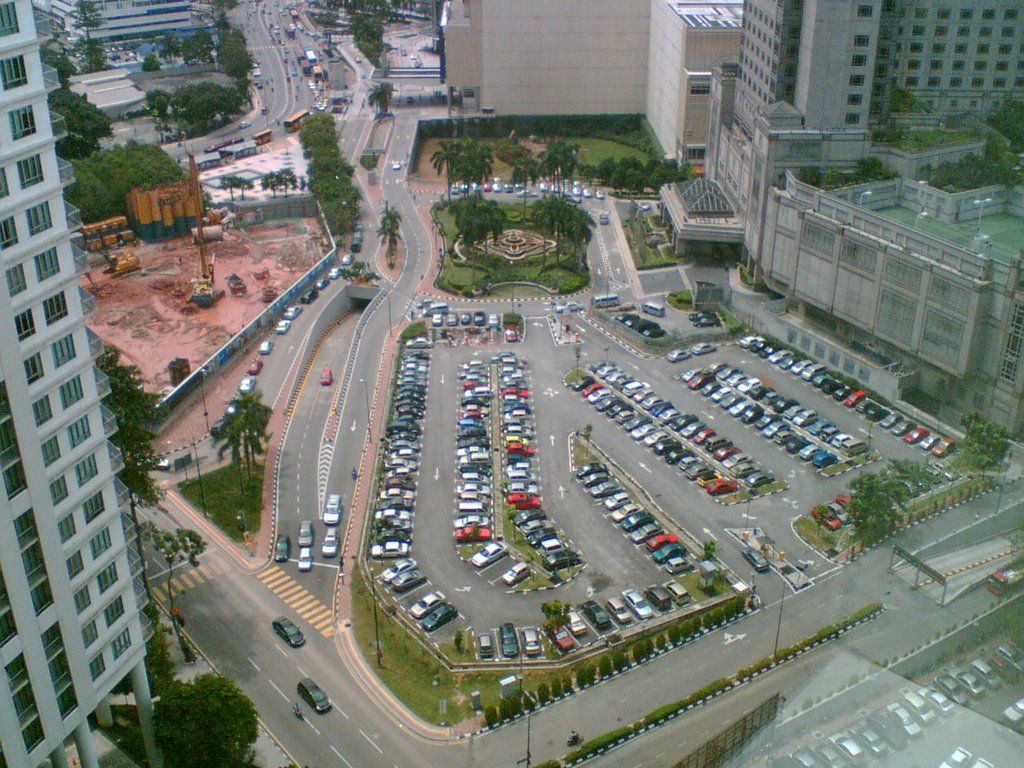
kat atas nih gambar yang aku amik dgn kamera phone. 1.3 mpx. bleh tahan jugak gambar dia punya kualiti. siap ada auto focus lagik... pemandangan dari opis aku. saja je aku amik gambar parking RM4.
kenapa aku panggil RM4...?? sebab tuh la satu satunya parking yang bleh kata paling murah. RM4, tapi sebelum kul 9 la.. lepas kul 9.. kene RM6.. macam 2 parking sebelah dia gak (tak nampak dalam gambar)
Tuesday, April 25, 2006
this is very urgent
palotak la...
skit skit urgent, ape hengat aku takda keje lain ke
"This is very urgent"
"Please do this ASAP, this is important document"
"blaa blaa blaaa..."
dah berpuluh kali dah aku dgr perkataan urgent arinih.. palotak korang la. tak jadi keje aku arinih asik buat bende tuh aje...
mangkukkk..!!
skit skit urgent, ape hengat aku takda keje lain ke
"This is very urgent"
"Please do this ASAP, this is important document"
"blaa blaa blaaa..."
dah berpuluh kali dah aku dgr perkataan urgent arinih.. palotak korang la. tak jadi keje aku arinih asik buat bende tuh aje...
mangkukkk..!!
prison break!
wahhh...
aku suka cite nih.. bukan senang aku nak adicted tgk cerita. pasal aku mgm memilih.. kekekekeke... tapi cite nih cool la.. aku suka.
kene carik gak nih.. kone donload... hohohoho....
p/s: sesapa dah donload tuh tolong pass kat aku skit eh...
aku suka cite nih.. bukan senang aku nak adicted tgk cerita. pasal aku mgm memilih.. kekekekeke... tapi cite nih cool la.. aku suka.
kene carik gak nih.. kone donload... hohohoho....
p/s: sesapa dah donload tuh tolong pass kat aku skit eh...
pda oh pda.... ehh... ke smartphone? 3G?
ermss...
dah seminggu lebih aku usha usha untuk pda, smartphone / 3G phone. sebab aku nak jual phone yang sekarang nih. sepupu aku nak beli. aku pun dengan rela hati nak jual la kan. sebab aku nak phone lain lak. tapi skang nih makin menjadi lak trend tukar henpon aku nih. kalau dulu tukar setahun sekali (sesaja upgrade) tapi la nih makin cepat.. paling cepat aku tukar 3-4 bulan. V220 aku kasi kat mak aku. aku beli lain lak. pastu aku dah boring ngan tepon sekarang. hahahaha... aku nak cari pda la... mebi satu pda second hand murah murah.. satu lagik phone biasa.. ataupun mebi pda tak payah.. aku beli je satu 3G phone ke... atau smartphone.
dilema sungguh la.. sekarang tengah bid utk pda hp iPaq 4150. ada rezeki.. dapat le yang tuh... pastu beli enpon murah murah je cukup... bajet total dalam RM900...
sekarang nih gila tengok barang kat lelong nye site.. hahaha rambang mata siot. si usin dah bid beli tali pinggang. dah menang bid dah pun.. wakakaka... taktau la ia dah deal dgn seller ke idak... kekekeke....
chowss..
dah seminggu lebih aku usha usha untuk pda, smartphone / 3G phone. sebab aku nak jual phone yang sekarang nih. sepupu aku nak beli. aku pun dengan rela hati nak jual la kan. sebab aku nak phone lain lak. tapi skang nih makin menjadi lak trend tukar henpon aku nih. kalau dulu tukar setahun sekali (sesaja upgrade) tapi la nih makin cepat.. paling cepat aku tukar 3-4 bulan. V220 aku kasi kat mak aku. aku beli lain lak. pastu aku dah boring ngan tepon sekarang. hahahaha... aku nak cari pda la... mebi satu pda second hand murah murah.. satu lagik phone biasa.. ataupun mebi pda tak payah.. aku beli je satu 3G phone ke... atau smartphone.
dilema sungguh la.. sekarang tengah bid utk pda hp iPaq 4150. ada rezeki.. dapat le yang tuh... pastu beli enpon murah murah je cukup... bajet total dalam RM900...
sekarang nih gila tengok barang kat lelong nye site.. hahaha rambang mata siot. si usin dah bid beli tali pinggang. dah menang bid dah pun.. wakakaka... taktau la ia dah deal dgn seller ke idak... kekekeke....
chowss..
The 10 worst ways to communicate with end users
You think you're a good communicator: You keep your users informed and you listen to their problems. So why is it that no one appears to read your e-mails or seems capable of following your instructions? Are you surprised to learn that the users have been living with computer issues rather than ask you for help? These are all signs of a breakdown in communication--which we, as support techs, frequently misinterpret as user indifference or even stupidity. Before long, we find ourselves on a downward spiral toward complete communications failure. Even with the best intentions, it's possible to sabotage our own attempts to communicate with the users by inadvertently committing one or more of the following deadly sins of miscommunication.
#1: Inappropriate nonverbal communication
Our words may say "Absolutely, yes, of course I don't mind helping you change the toner cartridge," while our facial expressions, tone, and body language simultaneously scream, "You complete and utter gimboid, do you honesty think that I spent four years in school, have an IQ of 167, and earned 53 technical certifications just so I could change your toner cartridge? Would you like me to breathe for you too?"
It's not necessary to be a behavioral psychologist to know that tutting under your breath, rolling your eyes, and suppressing little smirks combined with your apparently kind words, sends a patronizing, insulting message to the user. Instead, if you are frequently asked to perform such seemingly menial tasks as changing toner cartridges, turn it into an opportunity to educate and empower the user.
#2: Showing off
Just because we happen to know all the correct technical terms and concepts does not mean we should use them when communicating with users. Providing instructions that are overly technical and contain far more information than users need is not the most effective means of conveying our message. Instead of impressing a user with our superior knowledge, it alienates and belittles them and makes us seem supercilious and pompous. For example, telling users to clear their cache and delete their objects to solve a browser issue may be technically correct. But the chances are, if a user knows how to carry out these instructions, he or she has already done it. Try giving the user click-by-click instructions on how to perform these tasks, perhaps accompanied by a single line of explanation in terms the user can relate to. Aim to impress with your attitude instead of your knowledge.
#3: Losing patience
If William Langland had not coined the expression "Patience is a virtue" in 1377, I am firmly convinced that it would have been invented by an enlightened support tech sometime during the latter half of the twentieth century, just as humans were being introduced to computers in the workplace. Even though the computer literacy of the general working population has steadily improved over the intervening years, there always seems to be at least one user who simply doesn't get it, and whose persistence in demanding help for the same problem stretches our patience to its breaking point. Calling the user a brainless twit and bashing him or her over the head with a gel wrist relief may provide a moment of immense satisfaction, but it's likely to result in a miffed user and an unemployed support tech and should, therefore, be avoided at all costs. A better alternative is to develop techniques for (a) preventing such situations and (b) handling them appropriately when they do occur.
#4: Being dismissive
Imagine going to see your doctor because you have a mysterious green knobbly growth in your arm pit and all he does is pat you reassuringly on the back and tells you not to worry but do come back in a month or two if it hasn't gone away. How would this make you feel? What if the doctor didn't even look at the growth? This is precisely how we make the users feel when we fail to engage with their problems, dismissing them with platitudes and vacuous reassurances. Even though we may be 100 percent certain that Bob's computer isn't really taking twice as long to boot up and that Marcie must be imagining that high-pitched whine, telling them not to worry about it and to let you know if the problem doesn't go away achieves absolutely nothing except to make them feel stupid and insignificant.
Whether a computer problem is real or perceived makes little difference to users. All they know is that they have a problem that needs to be resolved. Even merely perceived problems can be fixed with some sensitivity and a little creativity. However insignificant the issue, by engaging in the problem and treating users with respect we increase their confidence in us and open the lines of communication.
#5: Failure to inform
This may seem like stereotyping, but in general geeks are not natural communicators, at least not when it comes to communicating with members of our own species. Unfortunately, the ability to meaningfully communicate with fellow human beings is a prerequisite for being effective in our role as support techs. In many organizations, the support tech is the user's prime interface with the IT department. Support techs function as Babel fish, translating between geek and human, and are ultimately responsible for ensuring that users are kept informed and up to date.
Constant communication is a critical part of fulfilling any work order, from acknowledging its receipt all the way through the process to a follow-up phone call to make sure the user is satisfied with the work performed. Often, a user can accept a delay provided he or she knows about it in advance and can plan accordingly.
#6: Lack of documentation
Not providing the users with consistent, clear, and easy-to-follow instructions is another way in which we frequently fail to communicate. Various aspects of our jobs require us to write user-consumable documentation, such as instructions for new procedures, explanation of corporate computer-usage polices, and manuals for new employees. Before distributing new documentation, test it out on a few users. Well-written documentation, kept organized and up-to-date, should ultimately save you time, as it provides users with an immediate resource for answering their questions.
#7: Lying
What should you do if you're asked to perform a task you find laborious or boring? Or what if you're asked a question to which you don't know the answer? What if the answer to a user's inquiry is something that will make them unhappy or that they don't want to hear? In such circumstances, bending the truth or misrepresenting the facts can be alluring, especially if the lie seems harmless and the chances of being caught are small. Is lying to the user ever justified?
Sometimes it's necessary to simplify the facts to give users an explanation they can comprehend, but this is different from deliberately lying to avoid work or save face. Many years ago, I worked with a senior support tech who was in the habit of blaming Microsoft for everything. When users came to him with a problem he could not immediately resolve, he would tell them it was a Microsoft issue and they just had to live with it. After awhile, users stopped going to him with their problems and he took to bragging about what a great job he was doing, as his users had so few issues. This situation continued until the next IT reorg, when he was assigned to a different group of users who were more computer-savvy and accustomed to being treated with more respect. A few weeks later, the tech was out of work due to the high level of complaints and his declining skills.
In short, when presented with a problem we can't resolve, for whatever reason, it's far better to be direct with users and help them find a resolution by some other means rather than mask our ignorance or unwillingness as an insoluble technical issue.
#8: Giving too much information
Honesty may be the best policy, but this does not mean it's appropriate to overburden the users with too much information. A mother of five grown-up boys once told me that in her experience, the average teenager will tune out all but the first three sentences of any lecture... so you want to pick those sentences carefully. It may be unfair to compare users with teenage boys, but the principle still applies: Limit communication to what's absolutely essential and don't expect users to absorb too much information at once.
It's possible to fail to communicate by overcommunicating, in terms of both frequency and detail. If we e-mail everyone in the company every time the slightest imperceptible change is made to the users' environment, many of the users will simply ignore the messages. Before long, work orders to set up inbox rules deleting messages from the IT department will start flowing in to the help desk.
Limit mass e-mail to the users who will actually be perceptibly affected by an upgrade, downtime, or some other change. If the impact is for a limited period of time, such as a lunchtime reboot of the e-mail server, set an expiration date and time on the message. Be careful not to overwhelm users with details or explanations that aren't relevant to them. For example, if the e-mail server needs an unexpected reboot at midday, give the users the time, expected length of outage, what it means for them, and what--if anything--they need to do. Users don't need to be given full explanation of why the reboot is necessary, although a single sentence summarizing the problem may help them appreciate the urgency and is more likely to elicit their cooperation.
#9: Not providing training
Training is not restricted to sitting in a classroom for three days learning how to create a PowerPoint presentation. Support tech-provided training can be as simple as a 30-second demonstration to a single user on how to add a contact to his or her address book or as complex as a multi-day onsite class on advanced report writing in Crystal. Even if providing training is not part of the support tech's formal job description, it's almost impossible to effectively fulfill the job function without training users. Some techs deliberately avoid educating users because they regard knowledgeable users as a threat to the integrity of the network or to their jobs. Although these concerns should not be dismissed as mere paranoia, they aren't valid reasons for failing to improve the computer literacy of users.
#10: Failing to listen
Communication is a two-way process. As support techs, we need to actively listen to our users. By definition, our role is to support our users, to enable them to perform their job functions, something we can hope to do only if we have a thorough understanding of their needs. As time allows, listening can be a proactive process, with the support tech spending time with users to learn their routines and to see where technology can be applied to improve productivity or safety.
Opportunities for user feedback can be created through feedback forms, satisfaction surveys, follow-up phone calls, and even brown bag lunches. Although it may not be possible or even desirable from a business standpoint to implement all of the users' requests, without making a concerted effort to align the IT function with the business directive, it's all too easy for the IT department to become wholly self-serving and to perceive the users as little more than an inconvenience.
#1: Inappropriate nonverbal communication
Our words may say "Absolutely, yes, of course I don't mind helping you change the toner cartridge," while our facial expressions, tone, and body language simultaneously scream, "You complete and utter gimboid, do you honesty think that I spent four years in school, have an IQ of 167, and earned 53 technical certifications just so I could change your toner cartridge? Would you like me to breathe for you too?"
It's not necessary to be a behavioral psychologist to know that tutting under your breath, rolling your eyes, and suppressing little smirks combined with your apparently kind words, sends a patronizing, insulting message to the user. Instead, if you are frequently asked to perform such seemingly menial tasks as changing toner cartridges, turn it into an opportunity to educate and empower the user.
#2: Showing off
Just because we happen to know all the correct technical terms and concepts does not mean we should use them when communicating with users. Providing instructions that are overly technical and contain far more information than users need is not the most effective means of conveying our message. Instead of impressing a user with our superior knowledge, it alienates and belittles them and makes us seem supercilious and pompous. For example, telling users to clear their cache and delete their objects to solve a browser issue may be technically correct. But the chances are, if a user knows how to carry out these instructions, he or she has already done it. Try giving the user click-by-click instructions on how to perform these tasks, perhaps accompanied by a single line of explanation in terms the user can relate to. Aim to impress with your attitude instead of your knowledge.
#3: Losing patience
If William Langland had not coined the expression "Patience is a virtue" in 1377, I am firmly convinced that it would have been invented by an enlightened support tech sometime during the latter half of the twentieth century, just as humans were being introduced to computers in the workplace. Even though the computer literacy of the general working population has steadily improved over the intervening years, there always seems to be at least one user who simply doesn't get it, and whose persistence in demanding help for the same problem stretches our patience to its breaking point. Calling the user a brainless twit and bashing him or her over the head with a gel wrist relief may provide a moment of immense satisfaction, but it's likely to result in a miffed user and an unemployed support tech and should, therefore, be avoided at all costs. A better alternative is to develop techniques for (a) preventing such situations and (b) handling them appropriately when they do occur.
#4: Being dismissive
Imagine going to see your doctor because you have a mysterious green knobbly growth in your arm pit and all he does is pat you reassuringly on the back and tells you not to worry but do come back in a month or two if it hasn't gone away. How would this make you feel? What if the doctor didn't even look at the growth? This is precisely how we make the users feel when we fail to engage with their problems, dismissing them with platitudes and vacuous reassurances. Even though we may be 100 percent certain that Bob's computer isn't really taking twice as long to boot up and that Marcie must be imagining that high-pitched whine, telling them not to worry about it and to let you know if the problem doesn't go away achieves absolutely nothing except to make them feel stupid and insignificant.
Whether a computer problem is real or perceived makes little difference to users. All they know is that they have a problem that needs to be resolved. Even merely perceived problems can be fixed with some sensitivity and a little creativity. However insignificant the issue, by engaging in the problem and treating users with respect we increase their confidence in us and open the lines of communication.
#5: Failure to inform
This may seem like stereotyping, but in general geeks are not natural communicators, at least not when it comes to communicating with members of our own species. Unfortunately, the ability to meaningfully communicate with fellow human beings is a prerequisite for being effective in our role as support techs. In many organizations, the support tech is the user's prime interface with the IT department. Support techs function as Babel fish, translating between geek and human, and are ultimately responsible for ensuring that users are kept informed and up to date.
Constant communication is a critical part of fulfilling any work order, from acknowledging its receipt all the way through the process to a follow-up phone call to make sure the user is satisfied with the work performed. Often, a user can accept a delay provided he or she knows about it in advance and can plan accordingly.
#6: Lack of documentation
Not providing the users with consistent, clear, and easy-to-follow instructions is another way in which we frequently fail to communicate. Various aspects of our jobs require us to write user-consumable documentation, such as instructions for new procedures, explanation of corporate computer-usage polices, and manuals for new employees. Before distributing new documentation, test it out on a few users. Well-written documentation, kept organized and up-to-date, should ultimately save you time, as it provides users with an immediate resource for answering their questions.
#7: Lying
What should you do if you're asked to perform a task you find laborious or boring? Or what if you're asked a question to which you don't know the answer? What if the answer to a user's inquiry is something that will make them unhappy or that they don't want to hear? In such circumstances, bending the truth or misrepresenting the facts can be alluring, especially if the lie seems harmless and the chances of being caught are small. Is lying to the user ever justified?
Sometimes it's necessary to simplify the facts to give users an explanation they can comprehend, but this is different from deliberately lying to avoid work or save face. Many years ago, I worked with a senior support tech who was in the habit of blaming Microsoft for everything. When users came to him with a problem he could not immediately resolve, he would tell them it was a Microsoft issue and they just had to live with it. After awhile, users stopped going to him with their problems and he took to bragging about what a great job he was doing, as his users had so few issues. This situation continued until the next IT reorg, when he was assigned to a different group of users who were more computer-savvy and accustomed to being treated with more respect. A few weeks later, the tech was out of work due to the high level of complaints and his declining skills.
In short, when presented with a problem we can't resolve, for whatever reason, it's far better to be direct with users and help them find a resolution by some other means rather than mask our ignorance or unwillingness as an insoluble technical issue.
#8: Giving too much information
Honesty may be the best policy, but this does not mean it's appropriate to overburden the users with too much information. A mother of five grown-up boys once told me that in her experience, the average teenager will tune out all but the first three sentences of any lecture... so you want to pick those sentences carefully. It may be unfair to compare users with teenage boys, but the principle still applies: Limit communication to what's absolutely essential and don't expect users to absorb too much information at once.
It's possible to fail to communicate by overcommunicating, in terms of both frequency and detail. If we e-mail everyone in the company every time the slightest imperceptible change is made to the users' environment, many of the users will simply ignore the messages. Before long, work orders to set up inbox rules deleting messages from the IT department will start flowing in to the help desk.
Limit mass e-mail to the users who will actually be perceptibly affected by an upgrade, downtime, or some other change. If the impact is for a limited period of time, such as a lunchtime reboot of the e-mail server, set an expiration date and time on the message. Be careful not to overwhelm users with details or explanations that aren't relevant to them. For example, if the e-mail server needs an unexpected reboot at midday, give the users the time, expected length of outage, what it means for them, and what--if anything--they need to do. Users don't need to be given full explanation of why the reboot is necessary, although a single sentence summarizing the problem may help them appreciate the urgency and is more likely to elicit their cooperation.
#9: Not providing training
Training is not restricted to sitting in a classroom for three days learning how to create a PowerPoint presentation. Support tech-provided training can be as simple as a 30-second demonstration to a single user on how to add a contact to his or her address book or as complex as a multi-day onsite class on advanced report writing in Crystal. Even if providing training is not part of the support tech's formal job description, it's almost impossible to effectively fulfill the job function without training users. Some techs deliberately avoid educating users because they regard knowledgeable users as a threat to the integrity of the network or to their jobs. Although these concerns should not be dismissed as mere paranoia, they aren't valid reasons for failing to improve the computer literacy of users.
#10: Failing to listen
Communication is a two-way process. As support techs, we need to actively listen to our users. By definition, our role is to support our users, to enable them to perform their job functions, something we can hope to do only if we have a thorough understanding of their needs. As time allows, listening can be a proactive process, with the support tech spending time with users to learn their routines and to see where technology can be applied to improve productivity or safety.
Opportunities for user feedback can be created through feedback forms, satisfaction surveys, follow-up phone calls, and even brown bag lunches. Although it may not be possible or even desirable from a business standpoint to implement all of the users' requests, without making a concerted effort to align the IT function with the business directive, it's all too easy for the IT department to become wholly self-serving and to perceive the users as little more than an inconvenience.
Monday, April 17, 2006
calar weeiiii calar.... kurang ajar betul la...!
hari sabtu.. pagi aku yang ceria telah di spoilkan oleh taktau sapa. makhluk tersebut telah mencalarkan kereta aku..!! arghh... bengangnya!! calar teruk.. dari permulaan pintu belakang, sampai la ke lampu belakang... warghh!! bengang betul aku.
nak polish mmg tak boleh. pasal cat dia dah tertanggal. nampak kesan putih. memang aku bengang sesangat. memang kurang ajar. ada saja makhluk yang dengki.


adus... camne nih. sesapa yang tau kalau ada polish power gaban bleh ilang kan parut kereta aku nih, tolong inform aku ASAP. sakit jiwa aku nengoknya...
nak polish mmg tak boleh. pasal cat dia dah tertanggal. nampak kesan putih. memang aku bengang sesangat. memang kurang ajar. ada saja makhluk yang dengki.
adus... camne nih. sesapa yang tau kalau ada polish power gaban bleh ilang kan parut kereta aku nih, tolong inform aku ASAP. sakit jiwa aku nengoknya...
Saturday, April 08, 2006
yet another saturday..
hoh...
sekali lagi sabtu menjengah. minggu nih memang rileks... takda apa apa hal nak dikejar. kalau minggu minggu sebelum nih selalu aku lepak kampung setiap minggu. dah macam aku gi kl je balik lipis. yela kan... dah aku gi kl tuh aku rasa macam aku gi subang jaya je dari s. alam... hahaha...
semua buat muka blur bila aku kata aku dok s. alam... semua kata jauh.. yela jauh, abihtu dah namanya keje. dah lebih 2 tahun dah... tak silap aku 2 tahun 9 bulan aku berulang s. alam - kuala lumpur. tetiap hari isnin - jumaat. tgk jem pun aku dah nak muntah dah.
lepas nih InsyaAllah aku mungkin dah tak perlu ulang alik s. alam - kl. lepas nih mungkin ulang alik s.alam - kelana jaya pulak atau mungkin s. alam - xxx (lokasi masih dirahsiakan). sebab bulan depan aku akan bertukar kerja. alhamdulillah. murah rezeki...
surat resign masih belum buat.. adeh.. Isnin aku nak kasi...
sekali lagi sabtu menjengah. minggu nih memang rileks... takda apa apa hal nak dikejar. kalau minggu minggu sebelum nih selalu aku lepak kampung setiap minggu. dah macam aku gi kl je balik lipis. yela kan... dah aku gi kl tuh aku rasa macam aku gi subang jaya je dari s. alam... hahaha...
semua buat muka blur bila aku kata aku dok s. alam... semua kata jauh.. yela jauh, abihtu dah namanya keje. dah lebih 2 tahun dah... tak silap aku 2 tahun 9 bulan aku berulang s. alam - kuala lumpur. tetiap hari isnin - jumaat. tgk jem pun aku dah nak muntah dah.
lepas nih InsyaAllah aku mungkin dah tak perlu ulang alik s. alam - kl. lepas nih mungkin ulang alik s.alam - kelana jaya pulak atau mungkin s. alam - xxx (lokasi masih dirahsiakan). sebab bulan depan aku akan bertukar kerja. alhamdulillah. murah rezeki...
surat resign masih belum buat.. adeh.. Isnin aku nak kasi...
Thursday, April 06, 2006

Create a dynamic photo gallery with PHP in three steps
Tentu korang pernah mengalami masalah nak organize korang punya gambar dari digital camera kan? kat sini aku letak cara nak buat dynamic photo gallery menggunakan skrip php. kenapa dynamic? sebab setiap kali korang letak gambar baru... dia akan appear secara automatik.
// define directory path
$dir = ".";
// iterate through files
// look for JPEGs
if (is_dir($dir)) {
if ($dh = opendir($dir)) {
while (($file = readdir($dh)) !== false) {
if (preg_match("/.jpg/", $file)) {
// read EXIF headers
$exif = exif_read_data($file, 0, true);
echo "";
// get thumbnail
// link to full image
echo "";
echo " ";
// get file name
echo "File: " . $exif['FILE']['FileName'] . "
";
// get timestamp
echo "Timestamp: " . $exif['IFD0']['DateTime'] . "
";
// get image dimensions
echo "Dimensions: " . $exif['COMPUTED']['Height'] . " x " . $exif['COMPUTED']['Height'] . "
";
// get camera make and model
echo "Camera: " . $exif['IFD0']['Model'];
echo " ";
echo " ";
}
}
closedir($dh);
}
}
?>
// define directory path
$dir = ".";
$image = exif_thumbnail($dir . "/" . $_GET['file']);
header("Content-Type: image/jpeg");
echo $image;
?>
p/s: perlu diingatkan di sini bahawa jika korang mahukan folder ini di upload, pastikan hosting korang semua support php.
Step 1: Make sure your PHP build supports EXIF
In order to read EXIF headers, your PHP build must include support for the EXIF module. You can check whether this support is enabled, by creating a PHP script containing the code shown in Listing A.
Listing A
View the output of this script in your Web browser, and review the list of extensions to see if EXIF is included. If it is, move to the next step. If not, you'll need to activate PHP's EXIF functions, either by un-commenting the extension line in php.ini (Windows) or recompiling your PHP build with the --enable-exif argument (UNIX). More information on how to do this is available at the PHP Web site.
Step 2: Move your photos into a single directory
Next, collect all your photos into a single directory under the Web server document root. This is also a good time to add your own descriptive comments to each image (although this is not essential). A number of good shareware and freeware tools are available to help you do this; take a look at Exifer for Windows or RoboPhoto.
Step 3: Write code to read photo headers and comments
The final step is to write the PHP scripts that will extract EXIF data from your images and automatically generate a Web page with thumbnails, technical information and links to larger versions of each image. There are two scripts here: the first one, gallery.php, (See Listing B) looks for photos and extracts EXIF headers from them, while the second one, thumbnail.php, (See Listing C) is responsible for extracting the thumbnail image from each photo.
Listing B - Here's the code for gallery.php
// define directory path
$dir = ".";
// iterate through files
// look for JPEGs
if (is_dir($dir)) {
if ($dh = opendir($dir)) {
while (($file = readdir($dh)) !== false) {
if (preg_match("/.jpg/", $file)) {
// read EXIF headers
$exif = exif_read_data($file, 0, true);
echo "
// get thumbnail
// link to full image
echo "
echo "
// get file name
echo "File: " . $exif['FILE']['FileName'] . "
";
// get timestamp
echo "Timestamp: " . $exif['IFD0']['DateTime'] . "
";
// get image dimensions
echo "Dimensions: " . $exif['COMPUTED']['Height'] . " x " . $exif['COMPUTED']['Height'] . "
";
// get camera make and model
echo "Camera: " . $exif['IFD0']['Model'];
echo "
echo "
}
}
closedir($dh);
}
}
?>
This script uses PHP's directory functions to retrieve a list of all the JPEG images in the directory, and then uses the exif_read_data() function to read the EXIF headers from each image as an array. Each image is displayed as a thumbnail using information provided by thumbnail.php, and each thumbnail is itself hyperlinked to its parent image. Relevant information—image name, dimensions, timestamp and camera model—is extracted from these headers and displayed with each thumbnail.
If you used an EXIF editor to add your own comments to the images, you can access the appropriate array elements to retrieve and display that information as well. Look inside the $exif array with print_r($exif) to find out the array path for your custom metadata.
Note: Different camera manufacturers use the EXIF headers in different ways. If the output of the script above appears to be missing some information, you should look inside the $exif array with print_r($exif) to find out exactly how your camera writes the EXIF data, and make appropriate adjustments to the array keys in the script above (Listing B).
Listing C - And here's the code for thumbnail.php
< ?php// define directory path
$dir = ".";
$image = exif_thumbnail($dir . "/" . $_GET['file']);
header("Content-Type: image/jpeg");
echo $image;
?>
Place both these scripts in the directory containing your photos, and then use your Web browser to access gallery.php. You should see thumbnails of the images in the directory, together with descriptive information on each. Clicking a thumbnail should take you to the larger parent image.
Figure A |
 |
p/s: perlu diingatkan di sini bahawa jika korang mahukan folder ini di upload, pastikan hosting korang semua support php.
Monday, April 03, 2006
marey marey layan command prompt pulak
marey marey layan command prompt ms windows. hari nih kita main main dengan sharing. apa itu sharing? sharing nih dalam bahasa melayu komputer nya adalah perkongsian fail fail yang ada dalam pc, server, drive, dan lain lain, asal boleh kongsi itu kira setel la... kecuali kongsi komputer. itu dah lain. yang kita nak buat ni adalah kongsi file atau folder. jom kita layaaaaaannn...
**Perhatian: segala langkah dibuat menggunakan platform win2K ke atas
okes... hari nih kita buat command NET SHARE. net share nih kegunaan dia adalah utk buat share folder, remove share folder, atau apa apa aja berkaitan share. kalau taktau command korang bole taip. ops.. memula kene la bukak command prompt kan. klik pada start, klik run, taip 'cmd'. kalau pakai windows 98 korang taip 'command'. dahtu nanti dia akan open satu popup. dari situ kita mula... kalau taktau command net share , korang taip:
net help share atau net share ?/
C:\Documents and Settings\Administrator>net help share
The syntax of this command is:
NET SHARE
sharename
sharename=drive:path [/GRANT:user,[READ | CHANGE | FULL]]
[/USERS:number | /UNLIMITED]
[/REMARK:"text"]
[/CACHE:Manual | Documents| Programs | None ]
sharename [/USERS:number | /UNLIMITED]
[/REMARK:"text"]
[/CACHE:Manual | Documents | Programs | None]
{sharename | devicename | drive:path} /DELETE
NET SHARE makes a server's resources available to network users. When
used without options, it lists information about all resources being
shared on the computer. For each resource, Windows reports the
devicename(s) or pathname(s) and a descriptive comment associated with it.
sharename Is the network name of the shared resource. Type
NET SHARE with a sharename only to display information
about that share.
drive:path Specifies the absolute path of the directory to
be shared.
/GRANT:user,perm Creates the share with a security descriptor that gives
the requested permissions to the specified user. This
option may be used more than once to give share permissions
to multiple users.
/USERS:number Sets the maximum number of users who can
simultaneously access the shared resource.
/UNLIMITED Specifies an unlimited number of users can
simultaneously access the shared resource
/REMARK:"text" Adds a descriptive comment about the resource.
Enclose the text in quotation marks.
devicename Is one or more printers (LPT1: through LPT9:)
shared by sharename.
/DELETE Stops sharing the resource.
/CACHE:Manual Enables manual client caching of programs and documents
from this share
/CACHE:Documents Enables automatic caching of documents from this share
/CACHE:Programs Enables automatic caching of documents and programs
from this share
/CACHE:None Disables caching from this share
NET HELP command | MORE displays Help one screen at a time.
----------------------------------------------------
okes... dah paham kan instruction dia... oleh itu meh kita try satu kali... ok.. utk kali ini kita cuba buat satu sharing. pergi ke my computer > C:\ . kemudian create satu folder nama test. dalam fodler tu letak le apa yang korang nak letak pun. ataupun kalau korang malas, dekat command prompt korang taip
cd C:\ (enter)
mkdir test (enter)
pehtu letak la file apa pun. sekarang kita nak share kan folder test. oleh itu.
net share test-sharing=C:\test /unlimited
command tersebut bermaksud:
net share - nama command
test-sharing - sharename
=C:\test - path di mana folder itu berada
/unlimited - jenis permission, jumlah user, etc
dan tekan enter. kemudian anda akan dapat result test-sharing was shared successfully. ini bermaksud shared folder telah berjaya. untuk tgk sama ada betul atau tidak folder tersebut telah di share. anda boleh taip
net view nama_pc atau net view \\nama
dan jika betul telah di share, anda akan nampak seperti di bawah
C:\Documents and Settings\Administrator>net view \\badrol
Shared resources at \\badrol
Share name Type Used as Comment
---------------------------------------------------------
test-sharing Disk
The command completed successfully.
aaa... kan dah jadik tuh... tapi yang aku ajar cuma basic saja la... boleh jugak letak permission, user grant access, FULL, READ, etc... memain dgn command dia... layann...
**Perhatian: segala langkah dibuat menggunakan platform win2K ke atas
okes... hari nih kita buat command NET SHARE. net share nih kegunaan dia adalah utk buat share folder, remove share folder, atau apa apa aja berkaitan share. kalau taktau command korang bole taip. ops.. memula kene la bukak command prompt kan. klik pada start, klik run, taip 'cmd'. kalau pakai windows 98 korang taip 'command'. dahtu nanti dia akan open satu popup. dari situ kita mula... kalau taktau command net share , korang taip:
net help share atau net share ?/
C:\Documents and Settings\Administrator>net help share
The syntax of this command is:
NET SHARE
sharename
sharename=drive:path [/GRANT:user,[READ | CHANGE | FULL]]
[/USERS:number | /UNLIMITED]
[/REMARK:"text"]
[/CACHE:Manual | Documents| Programs | None ]
sharename [/USERS:number | /UNLIMITED]
[/REMARK:"text"]
[/CACHE:Manual | Documents | Programs | None]
{sharename | devicename | drive:path} /DELETE
NET SHARE makes a server's resources available to network users. When
used without options, it lists information about all resources being
shared on the computer. For each resource, Windows reports the
devicename(s) or pathname(s) and a descriptive comment associated with it.
sharename Is the network name of the shared resource. Type
NET SHARE with a sharename only to display information
about that share.
drive:path Specifies the absolute path of the directory to
be shared.
/GRANT:user,perm Creates the share with a security descriptor that gives
the requested permissions to the specified user. This
option may be used more than once to give share permissions
to multiple users.
/USERS:number Sets the maximum number of users who can
simultaneously access the shared resource.
/UNLIMITED Specifies an unlimited number of users can
simultaneously access the shared resource
/REMARK:"text" Adds a descriptive comment about the resource.
Enclose the text in quotation marks.
devicename Is one or more printers (LPT1: through LPT9:)
shared by sharename.
/DELETE Stops sharing the resource.
/CACHE:Manual Enables manual client caching of programs and documents
from this share
/CACHE:Documents Enables automatic caching of documents from this share
/CACHE:Programs Enables automatic caching of documents and programs
from this share
/CACHE:None Disables caching from this share
NET HELP command | MORE displays Help one screen at a time.
----------------------------------------------------
okes... dah paham kan instruction dia... oleh itu meh kita try satu kali... ok.. utk kali ini kita cuba buat satu sharing. pergi ke my computer > C:\ . kemudian create satu folder nama test. dalam fodler tu letak le apa yang korang nak letak pun. ataupun kalau korang malas, dekat command prompt korang taip
cd C:\ (enter)
mkdir test (enter)
pehtu letak la file apa pun. sekarang kita nak share kan folder test. oleh itu.
net share test-sharing=C:\test /unlimited
command tersebut bermaksud:
net share - nama command
test-sharing - sharename
=C:\test - path di mana folder itu berada
/unlimited - jenis permission, jumlah user, etc
dan tekan enter. kemudian anda akan dapat result test-sharing was shared successfully. ini bermaksud shared folder telah berjaya. untuk tgk sama ada betul atau tidak folder tersebut telah di share. anda boleh taip
net view nama_pc atau net view \\nama
dan jika betul telah di share, anda akan nampak seperti di bawah
C:\Documents and Settings\Administrator>net view \\badrol
Shared resources at \\badrol
Share name Type Used as Comment
---------------------------------------------------------
test-sharing Disk
The command completed successfully.
aaa... kan dah jadik tuh... tapi yang aku ajar cuma basic saja la... boleh jugak letak permission, user grant access, FULL, READ, etc... memain dgn command dia... layann...
Tuesday, March 28, 2006
kereta turun harga?
kecoh sekarang pasal harga kereta dah turun. pagi tadik keluar surat khabar kata byk syarikat kereta besar yang turun harga sehingga pengurangan Rm20,000 - RM40,000. byk tuh.. tapi tu kereta besar la...
tapi dalam situasi aku.. takda la berguna sangat. lagipun mmg aku dah ada keta (walaupun aku nak pakai waja atau honda city tapi tak dapek) harga minyak tetap tinggi walau harga keta turun. apa bezanya. orang beli keta tetap pakai petrol. aku terasa macam nih agenda kerajaan je.. hahahahaha...
sekali pandang mmg nampak agak menguntungkan pembeli.. tapi dua kali pandang nampak macam menguntungkan pihak lain pulak.. ye la kan.. pepaham je la...
kalau dulu aku naik motor datang opis, RM5 bule pakai 3 kali pergi, 2 kali balik. tapi sekarang RM6 utk 2 kali pergi, 2 kali balik. umang ai... mendadak tul. memang terasa la perbezaan dia yang teramat la ketara nya.
apa apa jelah....
tapi dalam situasi aku.. takda la berguna sangat. lagipun mmg aku dah ada keta (walaupun aku nak pakai waja atau honda city tapi tak dapek) harga minyak tetap tinggi walau harga keta turun. apa bezanya. orang beli keta tetap pakai petrol. aku terasa macam nih agenda kerajaan je.. hahahahaha...
sekali pandang mmg nampak agak menguntungkan pembeli.. tapi dua kali pandang nampak macam menguntungkan pihak lain pulak.. ye la kan.. pepaham je la...
kalau dulu aku naik motor datang opis, RM5 bule pakai 3 kali pergi, 2 kali balik. tapi sekarang RM6 utk 2 kali pergi, 2 kali balik. umang ai... mendadak tul. memang terasa la perbezaan dia yang teramat la ketara nya.
apa apa jelah....
first storage system used by Google

What's this pile of Legos? It's the first storage system ever used by Google. Co-founders Larry Page and Sergey Brin built it themselves. Hard drives at the time maxed out at 4GB, and they piled 10 into this Lego motel. Google took it offline in 1999 and gave it to Stanford University.
interesting isn't it? utk lebih gambar gambar menarik ttg komputer awal boleh tgk kat
http://techrepublic.com.com/2300-10877_11-6052633-1.html
Wednesday, March 22, 2006
Nineteen words that don't belong in your resume
Takeaway:
Career coaches or head hunters may have told you that creating an effective resume means punching it up with jazzy verbs and adjectives. Not so, say IT hiring managers. In fact, if you're using glitzy modifiers, you could be doing your resume more harm than good. Here's a look at some recruiters' "favorite-hate" resume verbiage.
These suggestions are based on the article "Choose your words carefully when crafting a resume," by Molly Joss.
It's hard to believe that a few words could irritate someone enough to make them stop reading your resume, but it's true. Some hiring managers and recruiters admit that they have their own mental lists of words that annoy them. Resume how-to books may recommend that you pack your resume full of as many verbs, adjectives, and adverbs as you can. But if you aren't careful, you could turn off more prospective employers than you entice. Effective word choice is what really appeals to hiring managers--not action verbs and glittery modifiers. Here's a rundown of some words that hiring managers say detract from the persuasiveness of resumes they see.
Assist, assisted
* Reasons to avoid: Hiring managers want to know what you did, not how you helped. If you're familiar enough with a task to put it on your resume, you can choose a better word than assist.
* Example: Assisted marketing director by researching PDAs.
* Possible rephrasing: Researched PDAs for marketing department.
Experiment
* Reasons to avoid: No one wants to hear about what you tried to do--only what you have accomplished.
* Example: Experimented with new LAN management software.
* Possible rephrasing: Tested and evaluated new LAN management software.
Skillfully, effectively, carefully, quickly, expert, mastered
* Reasons to avoid: Hiring managers often object to words that describe how well you do a particular task. In many cases, it comes across as boastful--and it's unnecessary. "If you aren't good at it, why are you putting it on your resume?" one recruiter said.
* Example: Skillfully managed transition from Windows NT to Windows Server 2003.
* Possible rephrasing: Migrated organization from Windows NT to Windows Server 2003 with no downtime during business hours.
Cutting-edge, detail-oriented; coordinate, facilitate, transform; proven ability, synergy, and liaison
* Reasons to avoid: Hiring managers say such words take up space without communicating much. They've seen them so often that the words have lost their original energy.
* Example: Detail-oriented manager with proven ability to oversee day-to-day network operations and to implement major technology initiatives.
* Possible rephrasing: Supervised an eight-member IS staff; completed two full-scale platform migrations; consolidated equipment and resources following facilities move.
Responsible for...
* Reasons to avoid: You're a manager, so of course you're responsible for something. Specify exactly what your responsibilities are and work in a few numbers to convey the scope of what you do.
* Example: Responsible for managing inventory, overseeing network operations, making new equipment purchases, troubleshooting workstation issues.
* Possible rephrasing: Supervised the support of 70 users running Windows XP and two servers running Windows Server 2003; implemented asset management plan for inventorying equipment; built a network operations team responsible for the internal infrastructure.
source: techrepublic.com
Career coaches or head hunters may have told you that creating an effective resume means punching it up with jazzy verbs and adjectives. Not so, say IT hiring managers. In fact, if you're using glitzy modifiers, you could be doing your resume more harm than good. Here's a look at some recruiters' "favorite-hate" resume verbiage.
These suggestions are based on the article "Choose your words carefully when crafting a resume," by Molly Joss.
It's hard to believe that a few words could irritate someone enough to make them stop reading your resume, but it's true. Some hiring managers and recruiters admit that they have their own mental lists of words that annoy them. Resume how-to books may recommend that you pack your resume full of as many verbs, adjectives, and adverbs as you can. But if you aren't careful, you could turn off more prospective employers than you entice. Effective word choice is what really appeals to hiring managers--not action verbs and glittery modifiers. Here's a rundown of some words that hiring managers say detract from the persuasiveness of resumes they see.
Assist, assisted
* Reasons to avoid: Hiring managers want to know what you did, not how you helped. If you're familiar enough with a task to put it on your resume, you can choose a better word than assist.
* Example: Assisted marketing director by researching PDAs.
* Possible rephrasing: Researched PDAs for marketing department.
Experiment
* Reasons to avoid: No one wants to hear about what you tried to do--only what you have accomplished.
* Example: Experimented with new LAN management software.
* Possible rephrasing: Tested and evaluated new LAN management software.
Skillfully, effectively, carefully, quickly, expert, mastered
* Reasons to avoid: Hiring managers often object to words that describe how well you do a particular task. In many cases, it comes across as boastful--and it's unnecessary. "If you aren't good at it, why are you putting it on your resume?" one recruiter said.
* Example: Skillfully managed transition from Windows NT to Windows Server 2003.
* Possible rephrasing: Migrated organization from Windows NT to Windows Server 2003 with no downtime during business hours.
Cutting-edge, detail-oriented; coordinate, facilitate, transform; proven ability, synergy, and liaison
* Reasons to avoid: Hiring managers say such words take up space without communicating much. They've seen them so often that the words have lost their original energy.
* Example: Detail-oriented manager with proven ability to oversee day-to-day network operations and to implement major technology initiatives.
* Possible rephrasing: Supervised an eight-member IS staff; completed two full-scale platform migrations; consolidated equipment and resources following facilities move.
Responsible for...
* Reasons to avoid: You're a manager, so of course you're responsible for something. Specify exactly what your responsibilities are and work in a few numbers to convey the scope of what you do.
* Example: Responsible for managing inventory, overseeing network operations, making new equipment purchases, troubleshooting workstation issues.
* Possible rephrasing: Supervised the support of 70 users running Windows XP and two servers running Windows Server 2003; implemented asset management plan for inventorying equipment; built a network operations team responsible for the internal infrastructure.
source: techrepublic.com
Tuesday, March 21, 2006
Webcast: How to Choose Your Remote Access Solution
Webcast: How to Choose Your Remote Access Solution (LIVE!)
Thursday, March 23, 2006
2:00 PM ET / 11:00 AM PT
more info: http://whitepapers.techrepublic.com.com/abstract.aspx?docid=166199
Thursday, March 23, 2006
2:00 PM ET / 11:00 AM PT
more info: http://whitepapers.techrepublic.com.com/abstract.aspx?docid=166199
Friday, March 17, 2006
Radio Blog - HowTo
ramai orang tanya kat aku macam mana nak buat radio blog. jenuh jugak aku ajar. tapi ramai yang tak lepas. mungkin agak kurang pehamaman kot. ke aku yang tak reti ajar? hohohohoho... jadik ada yang mintak tolong buatkan guide tahap newbie. sebab aku takda masa sangat tu pasal aku tertangguh. jadik ada masa neh.. (curi masa keje) aku buat la.. muahahahaha... okes kita mula...
1. mula mula sila la download dulu radio blog tuh ek. kalau tak download macam mana nak buat kan? oleh itu sila ke http://www.radioblogclub.com. dan download radio blog dalam bentuk .zip files.

2. Kemudian, unzip file tersebut ke mana mana yang korang rasa mudah la... kalau rasa dalam system32 mudah, unzip kat situ. kalau rasa kat desktop senang, unzip kat desktop. Selepas dah unzip korang akan nampak satu folder nama "radio.blog.2.5". buka folder tersebut dan korang akan nampak ada 2 folder lagi. buka folder "creat.sound". kemudian copy file berformat .mp3 ke dalam folder tersebut.

3. selepas copy, double click file "convert32_xp.bat" (jika menggunakan win xp ke atas. jika win 2K dan 98, sila klik "convert32.bat"). kemudian satu popup menunjukkan progress file yang di convert. seperti di bawah

4. Setelah selesai semua conversion. buka folder "sounds". anda akan nampak semua file yang telah diconvert, berada di dalam folder tersebut. copy semua file yang telah di convert itu. kemudian pergi ke main directory folder "radio.blog.2.5". anda akan nampak folder radio.blog. buka folder tersebut dan di dalamnya ada satu lagi folder bernama "sounds". buka folder tu dan paste lagu yang telah diconvert ke dalam folder tersebut.

5. selepas selesai semuanya. pergi kembali ke main directory. kemudian upload folder "radio.blog" (boleh jugak rename sesedap rasa). taktau nak upload? aaa.. pergi carik sendiri... aku cuma boleh cadangkan korang upload ke hosting time. http://www.time.net.my .... sebab apa? sebab untuk radio blog, korang kene upload ke hosting yang SUPPORT PHP. dan untuk itu, hosting time memenuhi kriteria yang diperlukan, besides korang kene upload pakai ftp (windows explorer pun bleh, takyah download client). pastikan masa upload, kene upload satu folder. jgn upload satu satu...
6. selepas selesai upload. bukak browser dan taip address radio blog engkorang. macam aku, address dia http://www.centinix.com/radio/index.php ... kalau semua nya betul, ikut guide aku nih... korang akan dapat cam kat bawah...

pastu.. enjoy la radio blog korang... okes...
1. mula mula sila la download dulu radio blog tuh ek. kalau tak download macam mana nak buat kan? oleh itu sila ke http://www.radioblogclub.com. dan download radio blog dalam bentuk .zip files.
2. Kemudian, unzip file tersebut ke mana mana yang korang rasa mudah la... kalau rasa dalam system32 mudah, unzip kat situ. kalau rasa kat desktop senang, unzip kat desktop. Selepas dah unzip korang akan nampak satu folder nama "radio.blog.2.5". buka folder tersebut dan korang akan nampak ada 2 folder lagi. buka folder "creat.sound". kemudian copy file berformat .mp3 ke dalam folder tersebut.
3. selepas copy, double click file "convert32_xp.bat" (jika menggunakan win xp ke atas. jika win 2K dan 98, sila klik "convert32.bat"). kemudian satu popup menunjukkan progress file yang di convert. seperti di bawah
4. Setelah selesai semua conversion. buka folder "sounds". anda akan nampak semua file yang telah diconvert, berada di dalam folder tersebut. copy semua file yang telah di convert itu. kemudian pergi ke main directory folder "radio.blog.2.5". anda akan nampak folder radio.blog. buka folder tersebut dan di dalamnya ada satu lagi folder bernama "sounds". buka folder tu dan paste lagu yang telah diconvert ke dalam folder tersebut.
5. selepas selesai semuanya. pergi kembali ke main directory. kemudian upload folder "radio.blog" (boleh jugak rename sesedap rasa). taktau nak upload? aaa.. pergi carik sendiri... aku cuma boleh cadangkan korang upload ke hosting time. http://www.time.net.my .... sebab apa? sebab untuk radio blog, korang kene upload ke hosting yang SUPPORT PHP. dan untuk itu, hosting time memenuhi kriteria yang diperlukan, besides korang kene upload pakai ftp (windows explorer pun bleh, takyah download client). pastikan masa upload, kene upload satu folder. jgn upload satu satu...
6. selepas selesai upload. bukak browser dan taip address radio blog engkorang. macam aku, address dia http://www.centinix.com/radio/index.php ... kalau semua nya betul, ikut guide aku nih... korang akan dapat cam kat bawah...
pastu.. enjoy la radio blog korang... okes...
Thursday, March 16, 2006
Dari siam datang ke bangladesh
yep... aku datang ke blogspot. kenapa? saje aku suka suka... lama dah rasa nak pindah. baru hari nih berkesempatan. dan... aku dah sampai...!!!
Subscribe to:
Posts (Atom)
