Saturday, April 29, 2006

new phone!

baru 2 hari pakai... nokia 3230. features mmg ngam dgn apa yang aku nak. bleh kata semua features yang aku nak ada dalam phone nih kecuali 3G. nokia 3230 smartphone.

so far ok la pakai. ringan, selesa la.. pakai kat pinggang ngan poket pun tak rasa beban sangat.

kali nih mmg lama gila aku survey telefon. kalau dulu pegi je kedai phone tgk. kot ada yang berkenan aku amik la... tapi kali nih seminggu lebih aku surf internet cari info pasal telefon. ikutkan ada 3 model dalam pilihan aku. tapi aku pilih yang nih dulu la. features tak beza sangat dgn lagi 2 tuh.. tapi bentuk 3230 nih menarik perhatian aku.

nokia 3230 - http://europe.nokia.com/nokia/0,8764,65362,00.html

phone demo - http://europe.nokia.com/nokia/0,8764,65364,00.html


Thursday, April 27, 2006

1 2 3 check....


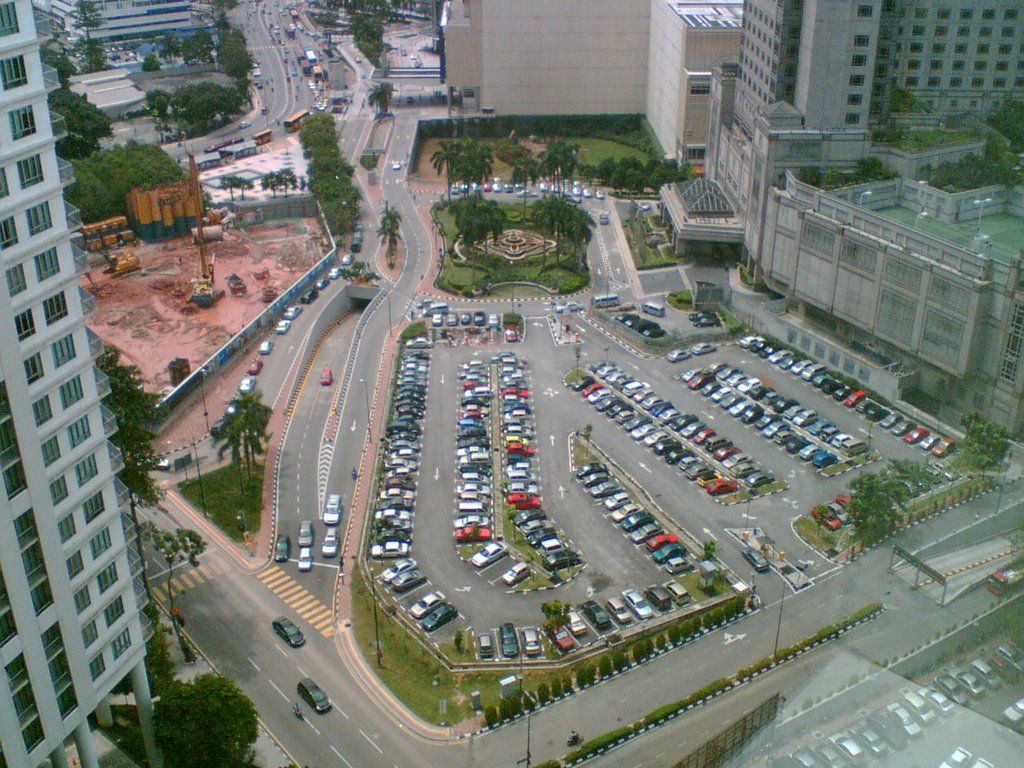
kat atas nih gambar yang aku amik dgn kamera phone. 1.3 mpx. bleh tahan jugak gambar dia punya kualiti. siap ada auto focus lagik... pemandangan dari opis aku. saja je aku amik gambar parking RM4.

kenapa aku panggil RM4...?? sebab tuh la satu satunya parking yang bleh kata paling murah. RM4, tapi sebelum kul 9 la.. lepas kul 9.. kene RM6.. macam 2 parking sebelah dia gak (tak nampak dalam gambar)

Tuesday, April 25, 2006

this is very urgent

palotak la...
skit skit urgent, ape hengat aku takda keje lain ke

"This is very urgent"
"Please do this ASAP, this is important document"
"blaa blaa blaaa..."

dah berpuluh kali dah aku dgr perkataan urgent arinih.. palotak korang la. tak jadi keje aku arinih asik buat bende tuh aje...


mangkukkk..!!

prison break!

wahhh...
aku suka cite nih.. bukan senang aku nak adicted tgk cerita. pasal aku mgm memilih.. kekekekeke... tapi cite nih cool la.. aku suka.

kene carik gak nih.. kone donload... hohohoho....


p/s: sesapa dah donload tuh tolong pass kat aku skit eh...

pda oh pda.... ehh... ke smartphone? 3G?

ermss...
dah seminggu lebih aku usha usha untuk pda, smartphone / 3G phone. sebab aku nak jual phone yang sekarang nih. sepupu aku nak beli. aku pun dengan rela hati nak jual la kan. sebab aku nak phone lain lak. tapi skang nih makin menjadi lak trend tukar henpon aku nih. kalau dulu tukar setahun sekali (sesaja upgrade) tapi la nih makin cepat.. paling cepat aku tukar 3-4 bulan. V220 aku kasi kat mak aku. aku beli lain lak. pastu aku dah boring ngan tepon sekarang. hahahaha... aku nak cari pda la... mebi satu pda second hand murah murah.. satu lagik phone biasa.. ataupun mebi pda tak payah.. aku beli je satu 3G phone ke... atau smartphone.

dilema sungguh la.. sekarang tengah bid utk pda hp iPaq 4150. ada rezeki.. dapat le yang tuh... pastu beli enpon murah murah je cukup... bajet total dalam RM900...

sekarang nih gila tengok barang kat lelong nye site.. hahaha rambang mata siot. si usin dah bid beli tali pinggang. dah menang bid dah pun.. wakakaka... taktau la ia dah deal dgn seller ke idak... kekekeke....

chowss..

The 10 worst ways to communicate with end users

You think you're a good communicator: You keep your users informed and you listen to their problems. So why is it that no one appears to read your e-mails or seems capable of following your instructions? Are you surprised to learn that the users have been living with computer issues rather than ask you for help? These are all signs of a breakdown in communication--which we, as support techs, frequently misinterpret as user indifference or even stupidity. Before long, we find ourselves on a downward spiral toward complete communications failure. Even with the best intentions, it's possible to sabotage our own attempts to communicate with the users by inadvertently committing one or more of the following deadly sins of miscommunication.


#1: Inappropriate nonverbal communication

Our words may say "Absolutely, yes, of course I don't mind helping you change the toner cartridge," while our facial expressions, tone, and body language simultaneously scream, "You complete and utter gimboid, do you honesty think that I spent four years in school, have an IQ of 167, and earned 53 technical certifications just so I could change your toner cartridge? Would you like me to breathe for you too?"

It's not necessary to be a behavioral psychologist to know that tutting under your breath, rolling your eyes, and suppressing little smirks combined with your apparently kind words, sends a patronizing, insulting message to the user. Instead, if you are frequently asked to perform such seemingly menial tasks as changing toner cartridges, turn it into an opportunity to educate and empower the user.


#2: Showing off


Just because we happen to know all the correct technical terms and concepts does not mean we should use them when communicating with users. Providing instructions that are overly technical and contain far more information than users need is not the most effective means of conveying our message. Instead of impressing a user with our superior knowledge, it alienates and belittles them and makes us seem supercilious and pompous. For example, telling users to clear their cache and delete their objects to solve a browser issue may be technically correct. But the chances are, if a user knows how to carry out these instructions, he or she has already done it. Try giving the user click-by-click instructions on how to perform these tasks, perhaps accompanied by a single line of explanation in terms the user can relate to. Aim to impress with your attitude instead of your knowledge.


#3: Losing patience


If William Langland had not coined the expression "Patience is a virtue" in 1377, I am firmly convinced that it would have been invented by an enlightened support tech sometime during the latter half of the twentieth century, just as humans were being introduced to computers in the workplace. Even though the computer literacy of the general working population has steadily improved over the intervening years, there always seems to be at least one user who simply doesn't get it, and whose persistence in demanding help for the same problem stretches our patience to its breaking point. Calling the user a brainless twit and bashing him or her over the head with a gel wrist relief may provide a moment of immense satisfaction, but it's likely to result in a miffed user and an unemployed support tech and should, therefore, be avoided at all costs. A better alternative is to develop techniques for (a) preventing such situations and (b) handling them appropriately when they do occur.


#4: Being dismissive


Imagine going to see your doctor because you have a mysterious green knobbly growth in your arm pit and all he does is pat you reassuringly on the back and tells you not to worry but do come back in a month or two if it hasn't gone away. How would this make you feel? What if the doctor didn't even look at the growth? This is precisely how we make the users feel when we fail to engage with their problems, dismissing them with platitudes and vacuous reassurances. Even though we may be 100 percent certain that Bob's computer isn't really taking twice as long to boot up and that Marcie must be imagining that high-pitched whine, telling them not to worry about it and to let you know if the problem doesn't go away achieves absolutely nothing except to make them feel stupid and insignificant.

Whether a computer problem is real or perceived makes little difference to users. All they know is that they have a problem that needs to be resolved. Even merely perceived problems can be fixed with some sensitivity and a little creativity. However insignificant the issue, by engaging in the problem and treating users with respect we increase their confidence in us and open the lines of communication.


#5: Failure to inform

This may seem like stereotyping, but in general geeks are not natural communicators, at least not when it comes to communicating with members of our own species. Unfortunately, the ability to meaningfully communicate with fellow human beings is a prerequisite for being effective in our role as support techs. In many organizations, the support tech is the user's prime interface with the IT department. Support techs function as Babel fish, translating between geek and human, and are ultimately responsible for ensuring that users are kept informed and up to date.

Constant communication is a critical part of fulfilling any work order, from acknowledging its receipt all the way through the process to a follow-up phone call to make sure the user is satisfied with the work performed. Often, a user can accept a delay provided he or she knows about it in advance and can plan accordingly.


#6: Lack of documentation

Not providing the users with consistent, clear, and easy-to-follow instructions is another way in which we frequently fail to communicate. Various aspects of our jobs require us to write user-consumable documentation, such as instructions for new procedures, explanation of corporate computer-usage polices, and manuals for new employees. Before distributing new documentation, test it out on a few users. Well-written documentation, kept organized and up-to-date, should ultimately save you time, as it provides users with an immediate resource for answering their questions.


#7: Lying

What should you do if you're asked to perform a task you find laborious or boring? Or what if you're asked a question to which you don't know the answer? What if the answer to a user's inquiry is something that will make them unhappy or that they don't want to hear? In such circumstances, bending the truth or misrepresenting the facts can be alluring, especially if the lie seems harmless and the chances of being caught are small. Is lying to the user ever justified?

Sometimes it's necessary to simplify the facts to give users an explanation they can comprehend, but this is different from deliberately lying to avoid work or save face. Many years ago, I worked with a senior support tech who was in the habit of blaming Microsoft for everything. When users came to him with a problem he could not immediately resolve, he would tell them it was a Microsoft issue and they just had to live with it. After awhile, users stopped going to him with their problems and he took to bragging about what a great job he was doing, as his users had so few issues. This situation continued until the next IT reorg, when he was assigned to a different group of users who were more computer-savvy and accustomed to being treated with more respect. A few weeks later, the tech was out of work due to the high level of complaints and his declining skills.

In short, when presented with a problem we can't resolve, for whatever reason, it's far better to be direct with users and help them find a resolution by some other means rather than mask our ignorance or unwillingness as an insoluble technical issue.


#8: Giving too much information


Honesty may be the best policy, but this does not mean it's appropriate to overburden the users with too much information. A mother of five grown-up boys once told me that in her experience, the average teenager will tune out all but the first three sentences of any lecture... so you want to pick those sentences carefully. It may be unfair to compare users with teenage boys, but the principle still applies: Limit communication to what's absolutely essential and don't expect users to absorb too much information at once.

It's possible to fail to communicate by overcommunicating, in terms of both frequency and detail. If we e-mail everyone in the company every time the slightest imperceptible change is made to the users' environment, many of the users will simply ignore the messages. Before long, work orders to set up inbox rules deleting messages from the IT department will start flowing in to the help desk.

Limit mass e-mail to the users who will actually be perceptibly affected by an upgrade, downtime, or some other change. If the impact is for a limited period of time, such as a lunchtime reboot of the e-mail server, set an expiration date and time on the message. Be careful not to overwhelm users with details or explanations that aren't relevant to them. For example, if the e-mail server needs an unexpected reboot at midday, give the users the time, expected length of outage, what it means for them, and what--if anything--they need to do. Users don't need to be given full explanation of why the reboot is necessary, although a single sentence summarizing the problem may help them appreciate the urgency and is more likely to elicit their cooperation.


#9: Not providing training

Training is not restricted to sitting in a classroom for three days learning how to create a PowerPoint presentation. Support tech-provided training can be as simple as a 30-second demonstration to a single user on how to add a contact to his or her address book or as complex as a multi-day onsite class on advanced report writing in Crystal. Even if providing training is not part of the support tech's formal job description, it's almost impossible to effectively fulfill the job function without training users. Some techs deliberately avoid educating users because they regard knowledgeable users as a threat to the integrity of the network or to their jobs. Although these concerns should not be dismissed as mere paranoia, they aren't valid reasons for failing to improve the computer literacy of users.


#10: Failing to listen

Communication is a two-way process. As support techs, we need to actively listen to our users. By definition, our role is to support our users, to enable them to perform their job functions, something we can hope to do only if we have a thorough understanding of their needs. As time allows, listening can be a proactive process, with the support tech spending time with users to learn their routines and to see where technology can be applied to improve productivity or safety.

Opportunities for user feedback can be created through feedback forms, satisfaction surveys, follow-up phone calls, and even brown bag lunches. Although it may not be possible or even desirable from a business standpoint to implement all of the users' requests, without making a concerted effort to align the IT function with the business directive, it's all too easy for the IT department to become wholly self-serving and to perceive the users as little more than an inconvenience.

Monday, April 17, 2006

calar weeiiii calar.... kurang ajar betul la...!

hari sabtu.. pagi aku yang ceria telah di spoilkan oleh taktau sapa. makhluk tersebut telah mencalarkan kereta aku..!! arghh... bengangnya!! calar teruk.. dari permulaan pintu belakang, sampai la ke lampu belakang... warghh!! bengang betul aku.

nak polish mmg tak boleh. pasal cat dia dah tertanggal. nampak kesan putih. memang aku bengang sesangat. memang kurang ajar. ada saja makhluk yang dengki.


adus... camne nih. sesapa yang tau kalau ada polish power gaban bleh ilang kan parut kereta aku nih, tolong inform aku ASAP. sakit jiwa aku nengoknya...

Saturday, April 08, 2006

yet another saturday..

hoh...
sekali lagi sabtu menjengah. minggu nih memang rileks... takda apa apa hal nak dikejar. kalau minggu minggu sebelum nih selalu aku lepak kampung setiap minggu. dah macam aku gi kl je balik lipis. yela kan... dah aku gi kl tuh aku rasa macam aku gi subang jaya je dari s. alam... hahaha...

semua buat muka blur bila aku kata aku dok s. alam... semua kata jauh.. yela jauh, abihtu dah namanya keje. dah lebih 2 tahun dah... tak silap aku 2 tahun 9 bulan aku berulang s. alam - kuala lumpur. tetiap hari isnin - jumaat. tgk jem pun aku dah nak muntah dah.

lepas nih InsyaAllah aku mungkin dah tak perlu ulang alik s. alam - kl. lepas nih mungkin ulang alik s.alam - kelana jaya pulak atau mungkin s. alam - xxx (lokasi masih dirahsiakan). sebab bulan depan aku akan bertukar kerja. alhamdulillah. murah rezeki...

surat resign masih belum buat.. adeh.. Isnin aku nak kasi...

Thursday, April 06, 2006

hahaha..!!


aku belek belek techrepublic.. terjumpa gambar nih... tergelak aku bila baca...

Create a dynamic photo gallery with PHP in three steps

Tentu korang pernah mengalami masalah nak organize korang punya gambar dari digital camera kan? kat sini aku letak cara nak buat dynamic photo gallery menggunakan skrip php. kenapa dynamic? sebab setiap kali korang letak gambar baru... dia akan appear secara automatik.


Step 1: Make sure your PHP build supports EXIF

In order to read EXIF headers, your PHP build must include support for the EXIF module. You can check whether this support is enabled, by creating a PHP script containing the code shown in Listing A.

Listing A


View the output of this script in your Web browser, and review the list of extensions to see if EXIF is included. If it is, move to the next step. If not, you'll need to activate PHP's EXIF functions, either by un-commenting the extension line in php.ini (Windows) or recompiling your PHP build with the --enable-exif argument (UNIX). More information on how to do this is available at the PHP Web site.

Step 2: Move your photos into a single directory

Next, collect all your photos into a single directory under the Web server document root. This is also a good time to add your own descriptive comments to each image (although this is not essential). A number of good shareware and freeware tools are available to help you do this; take a look at Exifer for Windows or RoboPhoto.

Step 3: Write code to read photo headers and comments

The final step is to write the PHP scripts that will extract EXIF data from your images and automatically generate a Web page with thumbnails, technical information and links to larger versions of each image. There are two scripts here: the first one, gallery.php, (See Listing B) looks for photos and extracts EXIF headers from them, while the second one, thumbnail.php, (See Listing C) is responsible for extracting the thumbnail image from each photo.

Listing B - Here's the code for gallery.php


// define directory path
$dir = ".";

// iterate through files
// look for JPEGs
if (is_dir($dir)) {
if ($dh = opendir($dir)) {
while (($file = readdir($dh)) !== false) {
if (preg_match("/.jpg/", $file)) {
// read EXIF headers
$exif = exif_read_data($file, 0, true);
echo "";
// get thumbnail
// link to full image
echo "";
echo "";
// get file name
echo "File: " . $exif['FILE']['FileName'] . "
";
// get timestamp
echo "Timestamp: " . $exif['IFD0']['DateTime'] . "
";
// get image dimensions
echo "Dimensions: " . $exif['COMPUTED']['Height'] . " x " . $exif['COMPUTED']['Height'] . "
";
// get camera make and model
echo "Camera: " . $exif['IFD0']['Model'];
echo "
";
echo "";
}
}
closedir($dh);
}
}
?>


This script uses PHP's directory functions to retrieve a list of all the JPEG images in the directory, and then uses the exif_read_data() function to read the EXIF headers from each image as an array. Each image is displayed as a thumbnail using information provided by thumbnail.php, and each thumbnail is itself hyperlinked to its parent image. Relevant information—image name, dimensions, timestamp and camera model—is extracted from these headers and displayed with each thumbnail.

If you used an EXIF editor to add your own comments to the images, you can access the appropriate array elements to retrieve and display that information as well. Look inside the $exif array with print_r($exif) to find out the array path for your custom metadata.

Note: Different camera manufacturers use the EXIF headers in different ways. If the output of the script above appears to be missing some information, you should look inside the $exif array with print_r($exif) to find out exactly how your camera writes the EXIF data, and make appropriate adjustments to the array keys in the script above (Listing B).

Listing C - And here's the code for thumbnail.php

< ?php
// define directory path
$dir = ".";
$image = exif_thumbnail($dir . "/" . $_GET['file']);
header("Content-Type: image/jpeg");
echo $image;
?>

Place both these scripts in the directory containing your photos, and then use your Web browser to access gallery.php. You should see thumbnails of the images in the directory, together with descriptive information on each. Clicking a thumbnail should take you to the larger parent image.


Figure A


p/s: perlu diingatkan di sini bahawa jika korang mahukan folder ini di upload, pastikan hosting korang semua support php.

Monday, April 03, 2006

marey marey layan command prompt pulak

marey marey layan command prompt ms windows. hari nih kita main main dengan sharing. apa itu sharing? sharing nih dalam bahasa melayu komputer nya adalah perkongsian fail fail yang ada dalam pc, server, drive, dan lain lain, asal boleh kongsi itu kira setel la... kecuali kongsi komputer. itu dah lain. yang kita nak buat ni adalah kongsi file atau folder. jom kita layaaaaaannn...

**Perhatian: segala langkah dibuat menggunakan platform win2K ke atas

okes... hari nih kita buat command NET SHARE. net share nih kegunaan dia adalah utk buat share folder, remove share folder, atau apa apa aja berkaitan share. kalau taktau command korang bole taip. ops.. memula kene la bukak command prompt kan. klik pada start, klik run, taip 'cmd'. kalau pakai windows 98 korang taip 'command'. dahtu nanti dia akan open satu popup. dari situ kita mula... kalau taktau command net share , korang taip:


net help share atau net share ?/


C:\Documents and Settings\Administrator>net help share
The syntax of this command is:


NET SHARE
sharename
sharename=drive:path [/GRANT:user,[READ | CHANGE | FULL]]
[/USERS:number | /UNLIMITED]
[/REMARK:"text"]
[/CACHE:Manual | Documents| Programs | None ]
sharename [/USERS:number | /UNLIMITED]
[/REMARK:"text"]
[/CACHE:Manual | Documents | Programs | None]
{sharename | devicename | drive:path} /DELETE

NET SHARE makes a server's resources available to network users. When
used without options, it lists information about all resources being
shared on the computer. For each resource, Windows reports the
devicename(s) or pathname(s) and a descriptive comment associated with it.

sharename Is the network name of the shared resource. Type
NET SHARE with a sharename only to display information
about that share.
drive:path Specifies the absolute path of the directory to
be shared.
/GRANT:user,perm Creates the share with a security descriptor that gives
the requested permissions to the specified user. This
option may be used more than once to give share permissions
to multiple users.
/USERS:number Sets the maximum number of users who can
simultaneously access the shared resource.
/UNLIMITED Specifies an unlimited number of users can
simultaneously access the shared resource
/REMARK:"text" Adds a descriptive comment about the resource.
Enclose the text in quotation marks.
devicename Is one or more printers (LPT1: through LPT9:)
shared by sharename.
/DELETE Stops sharing the resource.
/CACHE:Manual Enables manual client caching of programs and documents
from this share
/CACHE:Documents Enables automatic caching of documents from this share
/CACHE:Programs Enables automatic caching of documents and programs
from this share
/CACHE:None Disables caching from this share

NET HELP command | MORE displays Help one screen at a time.

----------------------------------------------------

okes... dah paham kan instruction dia... oleh itu meh kita try satu kali... ok.. utk kali ini kita cuba buat satu sharing. pergi ke my computer > C:\ . kemudian create satu folder nama test. dalam fodler tu letak le apa yang korang nak letak pun. ataupun kalau korang malas, dekat command prompt korang taip

cd C:\ (enter)
mkdir test (enter)


pehtu letak la file apa pun. sekarang kita nak share kan folder test. oleh itu.


net share test-sharing=C:\test /unlimited

command tersebut bermaksud:

net share - nama command
test-sharing - sharename
=C:\test - path di mana folder itu berada
/unlimited - jenis permission, jumlah user, etc

dan tekan enter. kemudian anda akan dapat result test-sharing was shared successfully. ini bermaksud shared folder telah berjaya. untuk tgk sama ada betul atau tidak folder tersebut telah di share. anda boleh taip


net view nama_pc atau net view \\nama


dan jika betul telah di share, anda akan nampak seperti di bawah

C:\Documents and Settings\Administrator>net view \\badrol
Shared resources at \\badrol

Share name Type Used as Comment
---------------------------------------------------------
test-sharing Disk
The command completed successfully.


aaa... kan dah jadik tuh... tapi yang aku ajar cuma basic saja la... boleh jugak letak permission, user grant access, FULL, READ, etc... memain dgn command dia... layann...